Multi-tenant Microsoft Purview management for MSPs

Clients need their data discovered, classified, protected and governed — for a compliance obligation, a client questionnaire, an insurance renewal, or AI readiness. Verify which Purview controls are actually in place in every client tenant, from DLP and sensitivity labels to retention, and deploy a baseline where a tenant has nothing.

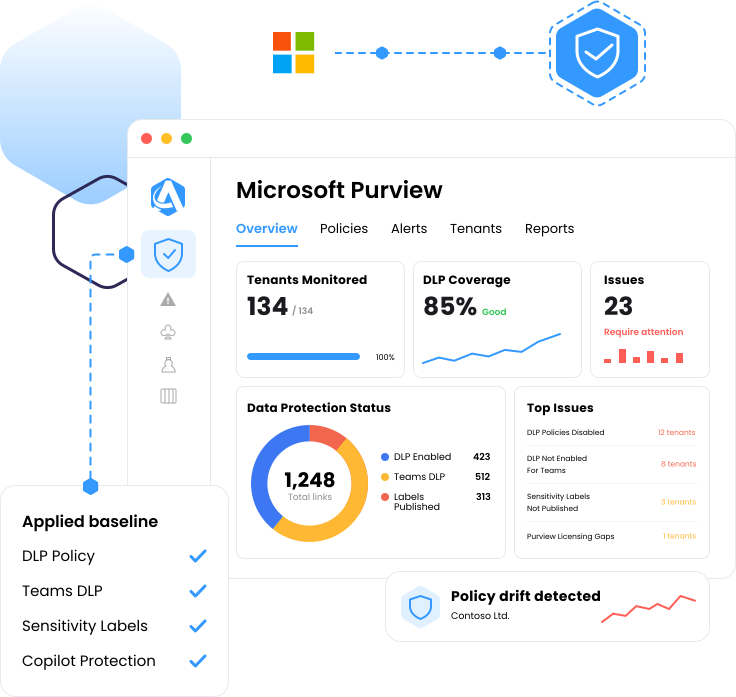
Purview Augmentt dashboard
Web page analyze 1
Verify

DLP, label and retention status read from every managed tenant

Mouse cursor add
Deploy

A baseline you can push to a tenant that has nothing

radar ai
Report

Exportable evidence mapped to recognized standards

Why nobody can say how a client's data is actually protected
Purview Admin Center
The data was never classified

A compliance audit, a client security questionnaire, an insurance renewal or a Copilot rollout all land on the same question: what is sensitive here, and who can reach it. The question comes back to the MSP, and the honest answer has been that nobody knows.

Purview Admin Center
Data protection ships off

DLP, sensitivity labeling and retention are not on by default. A client is exposed by inaction rather than by a mistake, and nothing surfaces the tenants where nothing has ever been configured.

Purview Admin Center
One portal per client

Purview is single-tenant. Across every client an MSP manages, checking DLP status means logging into a portal per client, or a script somebody now owns and maintains.

Know where every client's data protection actually stands
DLP policy verification across every tenant

See which clients have DLP policies enabled and which do not, read from the real tenant rather than from a spreadsheet somebody maintains. Whether DLP extends into Microsoft Teams is verified as its own check, so a gap in chat and channel coverage does not hide behind a green tick elsewhere.

Sensitivity labels, retention and DLP in one view

Coverage spans the Purview controls a client actually relies on to classify, protect and govern data — DLP policies, sensitivity label publication and retention labels — read from the same place. DLP for Microsoft 365 Copilot sits inside the DLP policies Augmentt manages, so AI readiness is one answer this view gives rather than the only reason to look.

Sensitivity label publication status, tenant by tenant

Sensitivity and retention label policies only do work once they are published. Augmentt shows publication status across every managed tenant, so the clients running on unclassified, ungoverned content are visible on one screen rather than discovered during an audit.

Deploy a data-protection baseline

When a team decides a client needs a starting point, a baseline data-protection configuration is there to deploy — a sensible starting point rather than a finished posture, since DLP and labeling still need tuning to each organization’s data. Nothing is pushed to a tenant until someone chooses to push it.

One source for the change and the evidence

Every data-protection control a team manages maps back to a recognized standard. Export the evidence in a click when an auditor or a cyber insurer asks for it, instead of rebuilding it by hand. And when a control needs premium Microsoft licensing, the view says so, turning a compliance gap into a licensing conversation.

CIS Microsoft 365
HIPAA
CMMC
NIST CSF
Essential Eight
SOC 2
Native admin centers vs. Augmentt

The same five jobs, done per tenant or done once.

The job
See which clients have DLP on
Confirm DLP reaches Teams
Answer the data protection question
Get a tenant off zero
Prove it to a client or auditor
Purview portal + scripts
One login per tenant, one screen at a time
Checked by hand, per client, if anyone remembers
Reassurance, because nothing shows the whole picture
A project scoped, quoted and absorbed per client
Screenshots assembled by hand before the QBR
Every managed tenant in one view, read from the real tenant
Verified as its own check on every tenant
Control state across DLP, labels and retention in one view
A baseline data-protection configuration you deploy on your schedule
Exportable posture reporting mapped to recognized standards
Three steps to data protection you can prove

01

Connect the tenants

Magic Link onboarding and GDAP automation bring client tenants in on the same delegated access an MSP already holds for user management and licensing.

02

See who has what

Read DLP policy status, DLP in Teams, and sensitivity and retention label publication per tenant, and see where licensing limits what a client can enforce.

03

Deploy where it is needed

Push a baseline when a tenant needs one, tune it to the client’s data, and come back to the same view to confirm where every tenant stands.

What changes for your team

The same coverage pays off differently depending on which seat you sit in.

A data governance service you can sell
No Purview portal per client

"We built an entire managed service around the Augmentt platform so we can sell our customers a service that will keep their tenants up to date and configured all the time rather than needing to do these professional services engagements periodically."

Tim Campbell
Practice Director, All Covered
Microsoft Purview coverage FAQs

Common questions from MSPs evaluating multi-tenant Microsoft 365 data protection.

What is multi-tenant Microsoft Purview management?

It is checking and deploying Microsoft 365 data protection across many tenants from one console instead of opening a Purview portal per client. Augmentt verifies whether DLP policies are enabled in each tenant, whether DLP extends into Microsoft Teams, and whether sensitivity label policies are published, and a baseline data-protection configuration can be deployed where a tenant has nothing.

Yes. DLP for Microsoft 365 Copilot is included in the DLP policies Augmentt manages, so an MSP can speak to whether a client’s data is protected before Copilot is pointed at it. It is one part of broader Purview coverage rather than the whole of it.

Yes. Sensitivity label policy publication status is read per tenant and shown across every managed tenant, so the clients with labels published and the clients with nothing are visible on the same screen.

Yes. Whether DLP extends into Microsoft Teams is its own check, alongside DLP policy status and sensitivity label publication status, so chat and channel coverage is not assumed from the rest of the tenant.

It is a sensible starting configuration, not a finished one. DLP and labeling need tuning to each organization’s data. The near-term value is knowing exactly where every client stands, and having a baseline ready to deploy when a tenant needs one.

Many are not. Relevant Microsoft licensing requirements are surfaced in the compliance view, so the gap is visible per tenant and becomes a concrete licensing conversation rather than a surprise.

Every check maps to a recognized standard — CIS, HIPAA, CMMC, NIST CSF, Essential Eight and SOC 2 — and posture is exportable. Augmentt evidences control state, so the report a client sees and the evidence an auditor sees come from the same source.

Lighthouse is oriented to identity and threat protection and does not reach Purview, Teams or SharePoint policy. That is why MSPs have had no cross-tenant answer for data protection.

Yes. Microsoft Purview sits alongside Conditional Access, Microsoft Intune, Defender, SharePoint and OneDrive sharing, and Microsoft Teams policy in the same multi-tenant console, with one compliance view across all of them.

See which clients have DLP on today

Run Microsoft 365 security reports across your customers and see where DLP is off, where sensitivity and retention labels were never published, and which clients cannot answer a data governance question today.

HIPAA

Healthcare & BAAs
MAPPED

NIST / CIS

Safety standards

MAPPED

CMMC

Federal contracting & DoD
MAPPED