4.5 Stars (100+ Reviews)

Manage Intune Across Every Client Tenant

Build your Intune standards once. Apply them per tenant, edited inline, without logging into each customer portal.

Trusted by MSPs Managing Thousands of Clients

How Intune Autopilot Works

The same repeatable process for every client, every time.

1

Review & Audit

See what’s configured across your client tenants and where attention is needed.

2

Choose a Template

Start from a recommended baseline or bring in your existing policy configuration.

3

Set the Baseline

Apply consistent policies across client environments to meet your security standard.

4

Deploy

Push policies, apps, and scripts to users, groups, or devices in a few steps.

5

Monitor

See compliance alerts across every tenant in one place. Stay ahead of drift.

What This Means for Your MSP

Less repetitive work. More consistent client environments. A security practice that can grow.

Reduce Client Security Risk

Consistent policies across tenants close the gaps that inconsistency creates. Fewer surprises in audits, fewer questions in renewals.

Save Hours Per Technician

Stop configuring the same things in 40 different portals. Build once, apply anywhere. That time goes somewhere better.

Scale Without Adding Headcount

Support growth without adding unnecessary complexity, with an approach that balances efficiency, security, and cost-effectiveness.
Device Configuration

Define your standard once. Apply it everywhere.

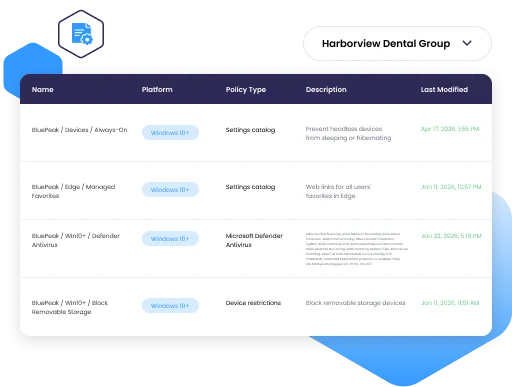
Configuration drift is one of the most common sources of client security incidents. When settings vary from tenant to tenant, audits fail and incidents happen. Intune Autopilot lets you define your preferred device configuration settings once and apply them to every client. Every device, every client, consistent baseline.

Intune Autopilot Device Configuration
Intune Autopilot Device Compliance
Device Compliance

One compliance standard, applied across all your clients.

Inconsistent compliance settings are easy to miss when you are moving between portals. Intune Autopilot gives you a single place to define compliance requirements and apply them across tenants. When Microsoft surfaces device compliance alerts, you see them for every tenant in one place, not one portal at a time.

Enrollment Profiles

New devices onboard the same way, every time.

When junior technicians deploy devices, predictable means fewer errors. Standardized enrollment profiles mean any tech on the team can onboard a device without going off-script. Set them up once, reuse across clients, skip the rework.

Intune Autopilot Enrollment Profiles
Intune Autopilot App and Script Deployment
App & Script Deployment

Deploy apps and scripts across tenants, not one portal at a time.

When a client needs a script run across every device or an app pushed to a fleet, doing it one tenant at a time is the kind of repetitive work that keeps technicians from doing anything else. Run scripts, push remediations, and manage app deployments across client tenants from Augmentt, the same way you manage everything else.

iOS MDM Policies

iOS devices across your clients, managed from the same place.

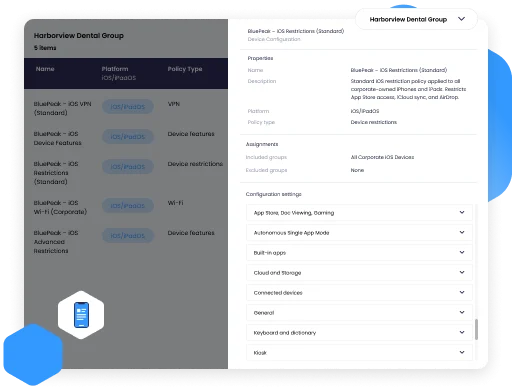
Client environments do not run on Windows alone. Managing iOS MDM policies in separate portals, per tenant, adds up fast. Intune Autopilot brings iOS MDM policy management into the same console where you handle everything else.

Intune Autopilot iOS MDM Policies
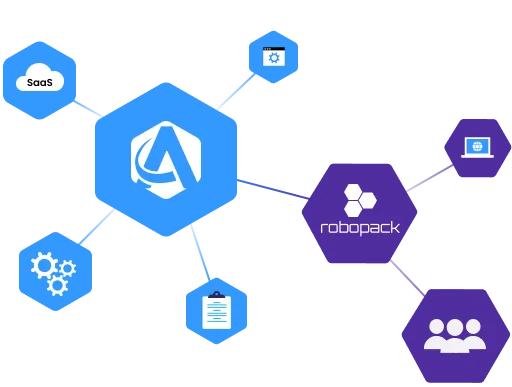
Augmentt Robopack Integration
Partnership

Patch Management, Built Into Your Workflow

Managing device patches and third-party apps is part of securing a client environment. Through a partnership with Robopack, you get access to a catalog of ready-to-deploy applications and patches across your client tenants.

Part of Secure Autopilot

An Add-On That Extends Your Security and Compliance

Intune Autopilot is an add-on to Secure Autopilot. It brings device configuration, compliance, and management into the security baseline you already run, so more of your Microsoft security work happens in one place.

Secure Autopilot

The Security Foundation

Security baseline deployment, drift detection, auto-remediation, and client-facing QBR reporting across every M365 tenant.

Intune Autopilot · Add-On

Device Security & Compliance

Extends Secure with device configuration, compliance, enrollment, apps, scripts, iOS MDM, and patch management across every client tenant.

Engage Autopilot · Add-On

User Lifecycle Automation

Automate M365 user onboarding and offboarding, license management, and access governance across clients.

FAQ

What does Intune Autopilot manage?

Intune Autopilot covers device configuration policies, device compliance policies, enrollment profiles, app and script deployment, iOS MDM policies, and patch management through the Robopack partnership. These are the core Intune capabilities MSPs need to manage consistently across client tenants.

No. Intune Autopilot adds a multi-tenant management layer on top of Intune. You still use Intune under the hood. What changes is that you stop logging into each customer’s portal to configure or update policies. Augmentt handles that from one place.

Robopack is a patch management partner integrated into the Intune Autopilot workflow, giving you a catalog of ready-to-deploy applications and patches across your client tenants. It costs the same as buying Robopack directly, with the added convenience of paying one vendor and receiving one bill through Augmentt.

You define your policy or template once and apply it per tenant. Intune Autopilot is built for per-tenant configuration with a consistent standard, not bulk simultaneous deployment. Each client’s environment gets the right policies, applied correctly.

Intune Autopilot is a paid add-on, separate from Secure and Engage Autopilot. Contact our team for pricing details for your tenant count and seat requirements.

MSPs managing multiple Microsoft 365 client tenants who want consistent Intune deployments, reduced technician time per client, and a standard they can repeat for every new client they add.

Ready to manage Intune at MSP scale?

See how Intune Autopilot works across your client tenants

About Augmentt

Augmentt’s values are deeply rooted in the history of our two founders, Derik Belair and Gavin Garbutt. The former founders of N-able came together with an idea that would forever shape the IT channel, by helping MSPs move from a break-fix model to creating managed services.

That same passion and vision is what let them to create Augmentt, a SaaS Security Management platform, optimized for Microsoft.

The platform is built for MSPs who are serious about creating a profitable future through managed SaaS services.


Run Unlimited Free M365 Security Reports

Across All Your Customers. Forever.

What our partners are saying

MSPs Leading With Augmentt

Why They Chose Augmentt:

“We built an entire managed service around the Augmentt platform so we can sell our customers a service that will keep their tenants up to date and configured all the time rather than needing to do these professional services engagements periodically. I think not only has the quality improved, but it’s opened up an entirely new service. We’ve been able to sell to our customers very successfully.”

– Tim Campbell, All Covered
What They’re Using Augmentt For:

Ready to get started?

Protect your customers from the growing cyber security threat landscape while growing your MSP by selling enhanced SaaS security services.
Monthly Update Webinar
Get the latest platform updates live every month!
Watch Demo
Take a self guided tour of the Augmentt platform.

© 2026 Augmentt. All Rights Reserved.

Terms & ConditionsPrivacy Policy