Multi-tenant Microsoft Exchange Online security for MSPs
Email is still where the compromise starts. Verify mailbox auditing, external auto-forwarding, legacy mail protocols and mailbox delegation across every client tenant, and deploy an Exchange baseline where a tenant has nothing.
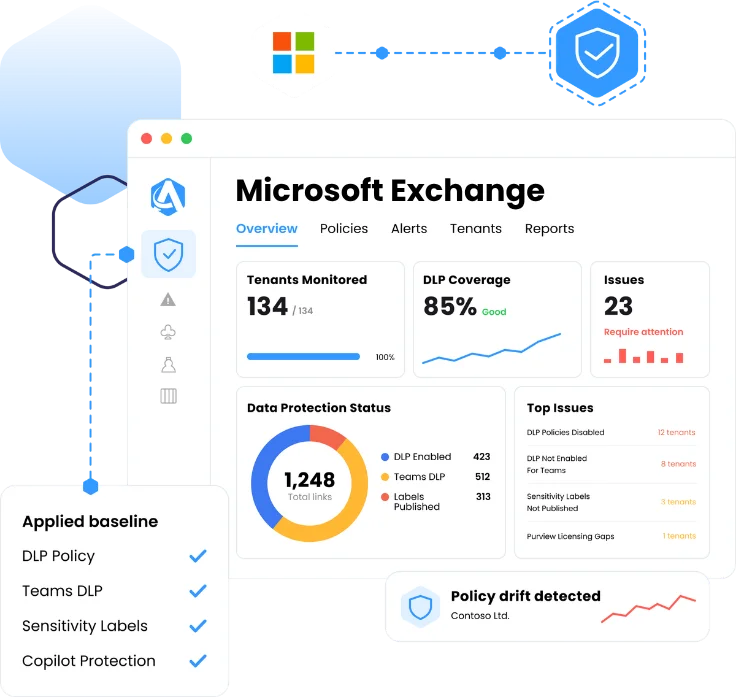
Exchange configuration across every client tenant in one view
Deploy
An Exchange baseline where a tenant has nothing
Monitor
Drift alerts when a control moves off the standard
Report
Exportable evidence mapped to recognized standards
Why mail configuration is the gap nobody can see across clients
The compromise starts in the mailbox
A forwarding rule quietly copying mail out, a legacy protocol accepting a password that skips MFA. These are configuration states, not alerts, and nothing is watching them across a whole client base.
Mail settings drift the most
Exchange is the workload clients and third-party vendors touch most often. A setting relaxed for one migration or one integration stays relaxed, and no one is told.
One admin center per client
The Exchange admin center is single-tenant. Across every client an MSP manages, answering one mail question means a login per client, or a script somebody now owns and maintains.
Core Features
Every client's mail configuration on one screen
External auto-forwarding, found across every tenant
Mail leaving the organization through a forwarding rule is the quietest form of data loss there is. Augmentt shows which tenants still allow external forwarding, so the risk is visible before an incident occurs.
SMTP AUTH, the last legacy protocol that bypasses MFA
SMTP AUTH still accepts a password on tenants where MFA is otherwise enforced. Augmentt shows which tenants have it enabled, so you find the gap between an MFA report and what mail actually accepts.
Mailbox auditing, verified before you need it
An investigation is only as good as the audit trail that was already running. Mailbox audit configuration sits in one view across the whole client base, so a team knows which clients have an evidence trail and which do not, ahead of the incident that depends on it.
Scored against a security baseline, with drift detection
Exchange configuration is scored against a security baseline alongside the rest of the tenant, so mail sits in the same compliance view as identity and endpoint. When a control moves off the standard, drift is flagged and the platform’s alerting, auto-remediation and snoozing apply.
One source for the change and the evidence
Every Exchange control a team manages maps back to a recognized standard. Export the evidence in a click when an auditor or a cyber insurer asks for it, instead of rebuilding it by hand. And when a control needs premium Microsoft licensing, the view says so, turning a compliance gap into a licensing conversation.
CIS Microsoft 365
HIPAA
CMMC
NIST CSF
ISO 27001
Microsoft Secure Score
Native admin centers vs. Augmentt
The same five jobs, done per tenant or done once.
The job
Find mail forwarding out of the org
Close legacy authentication
Know the audit trail exists
Get a tenant onto the standard
Prove it to a client or auditor
Exchange admin center + scripts
One login per tenant, one mailbox list at a time
Checked by hand, per client, if anyone remembers
Discovered during the investigation that needs it
A project scoped, quoted and absorbed per client
Screenshots assembled by hand before the QBR
External forwarding status for the whole client base in one view
SMTP AUTH status verified on every tenant
Audit configuration visible across all tenants, ahead of time
A baseline Exchange configuration deployed from Augmentt
Exportable posture reporting mapped to recognized standards
Three steps to mail configuration you can prove
01
Connect the tenants
Magic Link onboarding and GDAP automation bring client tenants in on the permission model an MSP already uses for Conditional Access and Intune.
02
See what mail is actually doing
Compare auto-forwarding, SMTP AUTH, mailbox auditing and delegation across every client in one view, and see where licensing limits what a client can enforce.
03
Deploy and hold it
Push a baseline where a tenant has nothing, then let drift alerts tell the team when a forwarding rule or a legacy protocol comes back.
What changes for your team
The same coverage pays off differently depending on which seat you sit in.
For MSP owners
Email security you can stand behind
Answer "is our email locked down" with control state across every client instead of a technician's recollection.
Holding mail configuration to a standard becomes a service you sell rather than remediation you absorb after an incident.
When a client sees which controls their licensing cannot support, premium licensing becomes their requirement rather than your upsell.
For MSP techs
No Exchange admin center per client
Check forwarding, legacy protocols, auditing and delegation across every client without a login per tenant.
Push a baseline instead of retyping the same mail settings in each admin center.
Runs on the GDAP permissions already in place for Conditional Access and Intune, with no scripts to maintain.
"We built an entire managed service around the Augmentt platform so we can sell our customers a service that will keep their tenants up to date and configured all the time rather than needing to do these professional services engagements periodically."
Tim Campbell
Practice Director, All Covered
Microsoft Exchange coverage FAQs
Common questions from MSPs evaluating multi-tenant Exchange Online management.
What is multi-tenant Exchange Online management?
It is checking and setting Exchange Online security configuration across many client tenants from one console instead of opening the Exchange admin center per client. Augmentt shows mail configuration across all client tenants in one view, flags where a control is off, and deploys a baseline Exchange configuration where a tenant has nothing.
Can Augmentt show which tenants allow mail to forward outside the organization?
Yes. The external auto-forwarding setting is shown across every managed tenant in one view, so the tenants where mail is still allowed to leave the organization are visible on one screen rather than found after an incident.
Does Augmentt check for legacy authentication in Exchange Online?
Yes. SMTP AUTH status is shown across the whole client base in one view, so the clients still accepting authentication that bypasses MFA are identifiable at a glance rather than one login at a time.
Can mailbox auditing be checked across all clients?
Yes. Mailbox audit configuration is shown across every managed tenant in one view, so a team knows before an incident which clients have the audit trail an investigation depends on and which do not.
Can Exchange configuration be deployed to many tenants at once?
Yes, a custom or standardized Exchange baseline can be pushed across tenants.
What happens when an Exchange control drifts from the standard?
Drift on a managed control is flagged against the same benchmark used for reporting, and the platform’s alerting, auto-remediation and snoozing apply, so a re-enabled forwarding rule or a re-opened legacy protocol surfaces as an alert rather than as an audit finding later.
Can this be proven to an auditor?
Every check maps to a recognized standard including CIS, HIPAA, CMMC, NIST CSF and Microsoft Secure Score, and posture is exportable. Augmentt evidences control state, so the report a client sees and the evidence an auditor sees come from the same source.
Doesn't Microsoft 365 Lighthouse already do this?
Augmentt scores each tenant’s Exchange configuration against a named benchmark and exports the result as evidence. Lighthouse deploys baseline tasks and reports whether they landed; it doesn’t produce a benchmark score or an auditor-ready record.
Does Augmentt cover other Microsoft 365 workloads?
Yes. Microsoft Exchange sits alongside Conditional Access, Microsoft Intune, Defender, SharePoint and OneDrive sharing, Microsoft Teams policy and Microsoft Purview in the same multi-tenant console, with one compliance view across all of them.
See where mail is leaving your clients today
Run Microsoft 365 security reports across your customers and see which tenants still allow external forwarding, which still accept legacy protocols, and where mailbox auditing was never switched on.