



TL;DR
- SharePoint settings in Augmentt, including notifications, page controls, and the full sharing block, can now be saved as templates and applied to other tenants.
- Teams policy management adds App Setup and Event Settings, bringing six policy types that can be combined into one baseline.
- A curated Purview library covers DLP, retention, and sensitivity labels, and every DLP template defaults to detect-and-notify.
- Five new Compliance Audit checks were added, and a Secure Score filter narrows the assessment view to checks that affect the score.
A new healthcare client signs, and someone on your team has to stand up HIPAA-ready DLP, retention, and sensitivity label policies for them by hand. A week later, a different client wants Teams locked down so outsiders can’t message staff or spin up new teams, and you’re rebuilding that same policy from scratch for the fifth tenant this month. None of it is hard. It’s just the kind of work that never gets faster no matter how many times you do it.
Here’s what shipped.
SharePoint Settings Are Now Fully Configurable, and Templatable
SharePoint settings inside Augmentt now cover more ground, and every one of them can be saved as a template. Notifications, page creation and commenting, and the full sharing block (external sharing for SharePoint and OneDrive, resharing, allowed domains, guest access expiration, link permissions) are all here in one screen instead of scattered across the SharePoint admin center. Build the configuration once, save it as a template, and apply it to the next tenant instead of clicking through the same settings again. System Users permission controls who on your team can view or change them.

Teams Policies Add App Setup and Event Settings, and Get Templatable
Teams policy management picks up two policy types it was missing: App Setup and Event Settings, alongside the existing Meeting, Messaging, Channels, and External Access policies. That’s six policy types you can now mix into a single baseline and push out as one deployable unit, instead of assigning each policy type separately.
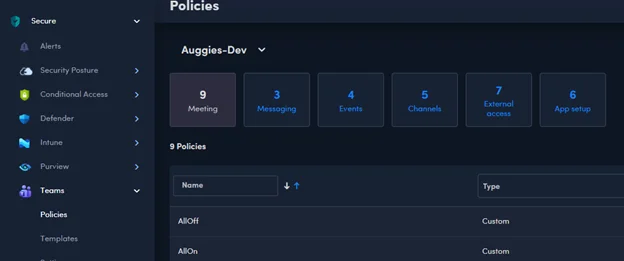
Creating a template works the same way it does elsewhere in Augmentt: pick Settings Template from the Create New menu and it’s ready to reuse on the next tenant.

Teams settings themselves are templatable now too, and System Users permission extends to Teams the same way it already covers Purview and SharePoint: Disabled, Read-only, or Manage, set per user.

Purview Gets a Curated Information Protection Library
A new library of Augmentt-curated Information Protection templates deploys straight from the Templates tab and covers all three Purview surfaces: DLP, retention, and sensitivity labels.
On DLP, the library gives you regional and vertical starting points: UK, AU, EU, and CA PII, HIPAA PHI, FERPA, GLBA, and Microsoft’s own built-in US PII policy. Every one of them defaults to detect-and-notify, so nothing starts out blocking mail or file access on day one. You decide whether to switch a policy to enforce at deploy time.
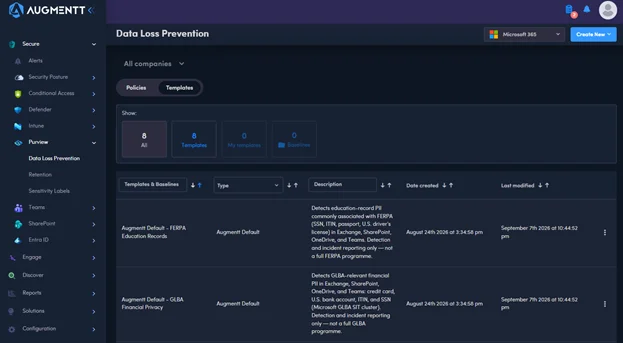
On retention, you get the standard duration schedules (1, 3, 7, and 10 years) plus the HIPAA 6-year and SOX 5-year schedules already built. On sensitivity labels, there’s a standard set (Public, Internal, Confidential) plus vertical labels for PHI, attorney-client privileged material, and education records. None of this replaces the tuning a client’s own data needs, but it means nobody on your team is building a FERPA DLP policy from a blank screen.
One more Purview change in this release: you can now change a DLP policy’s evaluation priority directly from the policies table, without opening the policy itself.

New Compliance Audit Checks
Five checks joined the Compliance Audit library this release:
- Comprehensive attachment-filtering policy
- Zero-hour auto purge for Microsoft Teams
- Notifications for internal users sending malware
- Restrict third-party storage services
- Restrict shared bookings pages
Secure Score Gets Its Own Filter
The assessment view now has a Secure Score filter card that narrows the list down to just the checks that pull a Microsoft Secure Score, so you’re not scrolling past framework checks that don’t touch it. Augmentt also mapped more checks to Secure Score this release, which means more of the posture work you’re already doing shows up as points on the score.

AI Risk Report Improvements
Three changes landed in the AI Risk Report based on partner feedback: you can now open the full employee detail view from any user table in the report, service principal permissions reflect the unique permissions actually granted instead of raw assignment records, and the report’s scoring details are more accurate. Thanks to everyone who sent in feedback on this one.
Where to Find It
SharePoint settings and templates live under Secure > SharePoint. Teams policies and templates are under Secure > Teams. The new Purview library sits on the Templates tab inside Secure > Purview > Data Loss Prevention (retention and sensitivity label templates are on their respective tabs in the same Purview section), and DLP policy priority is a column on the Policies tab right next to it. Secure Score’s new filter is on the assessment view under Security Posture, and the AI Risk Report lives in Reports. System Users permissions for all of this are managed under Configuration.