
Most companies think offboarding ends when HR closes the file, and your employee badge is returned. But online accounts often stay open long after that. A single login can still reach email, Teams, shared files, and more, and few people ever notice or say anything.
To find out how often this happens, Augmentt surveyed 1,007 workers who left a job in the past three years. The results show how many could still log in to former employers’ systems, which apps and files remained within reach, and how rarely anyone reported it.
Key takeaways
- 44% of former employees say they could still access company systems after leaving their jobs.
- 1 in 8 former employees who retained access say their old company login still works today.
- Nearly 2 in 3 former employees with lingering access to company systems never reported it.
- More than half of former employees with lingering access deliberately tested whether their old logins still worked.
- 38% of former employees who used their old logins accessed company information they were no longer authorized to see.
- 1 in 4 former employees still have confidential company information on personal devices or accounts.
- Nearly 2 in 3 former employees with lingering access could still access Microsoft workplace tools, including Outlook, Teams, SharePoint, or OneDrive.
How many former employees can still log in after they leave
Offboarding gaps are common, and the open door doesn’t close quickly.
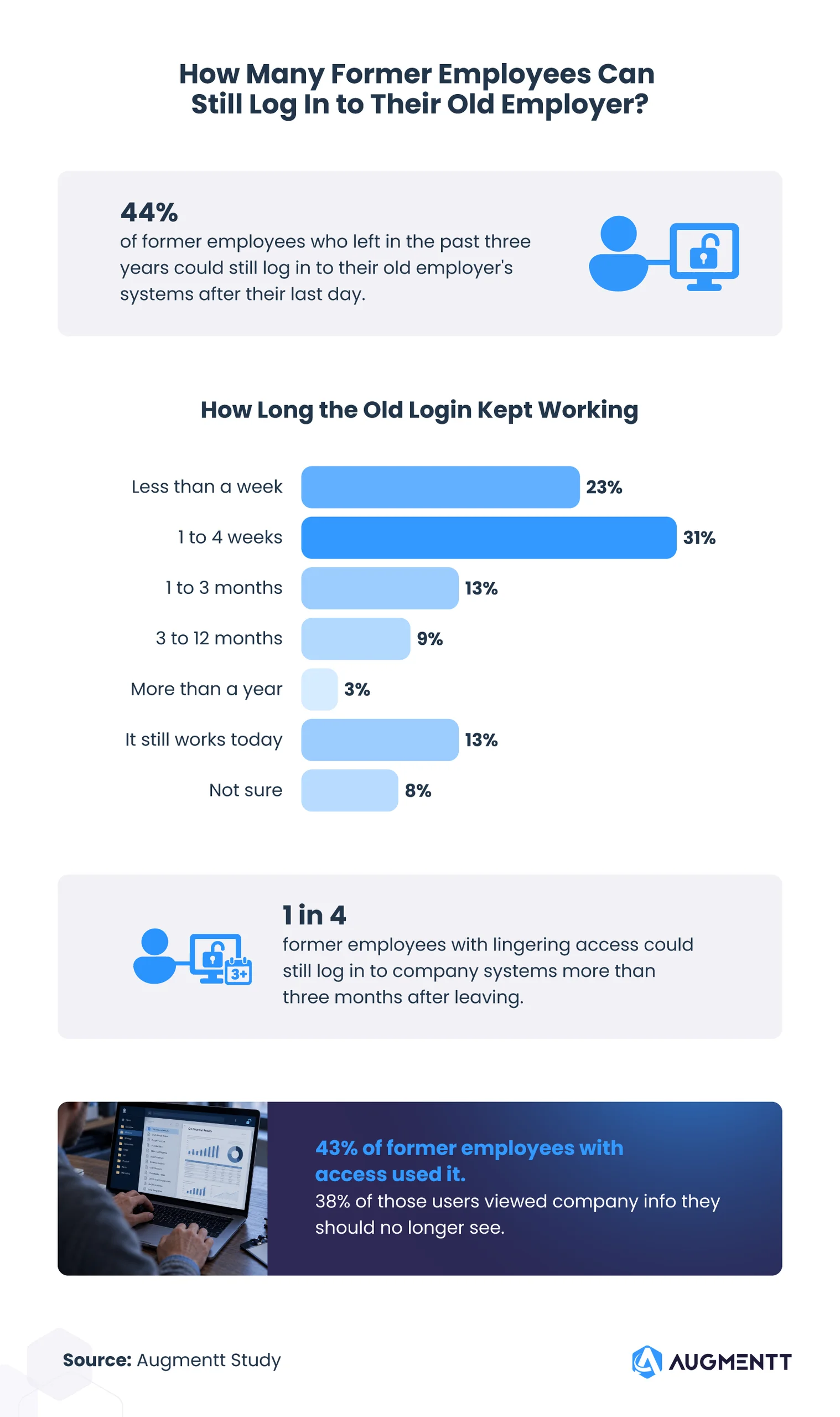
Among all former employees, 44% could still log in to a former employer’s systems after their last day. Another 11% weren’t sure.
Once the door was open, it stayed open. About 1 in 4 former employees with lingering access could log in more than three months after leaving, and for 13%, the old login still works today.
Many walked through it. Among former employees with lingering access, 23% used it more than once and 20% used it once. Another 57% could have used it but didn’t
What they saw matters. Among former employees who used their old login more than once, 48% viewed company information they should no longer have access to. Among those who used it once, the figure was 26%.
Some industries had more open doors than others. Among former employees, 54% of hospitality and food service workers and 53% of retail workers could still log in, compared with 32% of healthcare workers. Among former employees with lingering access, 35% of former tech employees said it kept working for more than three months, compared with 14% of former retail employees.
Outlook, Teams, and company files stayed within reach
A login isn’t just one door. It can open several apps at once.

Among former employees with lingering access, 48% could still open Outlook, 33% could open Teams, 25% could open OneDrive, and 11% could open SharePoint. In all, 64% could still open at least one of those four Microsoft 365 apps, and 70% could open two or more work apps. Specifically, 35% could open two or more Microsoft 365 apps, and 5% could open all four. Another 41% could open three or more work apps.
Company files also left with people. Overall, 26% of former employees still have confidential company information on their personal devices or accounts. That breaks down this way:
- 10% have it on a personal device only.
- 9% have it in a personal email or account only.
- 7% have it in both places.
Former employees with lingering access were more likely to keep files (34%) than those without access (20%).
Company messages also kept coming, with 37% of former employees saying they received company emails, meeting invites, Teams alerts, or shared-file updates after leaving. Among those with lingering access, 56% did, compared with 22% of those without access.
Some groups kept more than others:
- 40% of former employees earning $100,000 or more still have confidential company information, compared with 21% of those earning under $25,000.
- 36% of former finance and insurance employees still have it, compared with 18% of former healthcare employees.
- 51% of former freelancers and contractors continued to receive company messages after their work ended, while fewer former full- and part-time employees did (36%).
Most former employees told no one their login still worked
Nobody can close a gap they don’t know about.
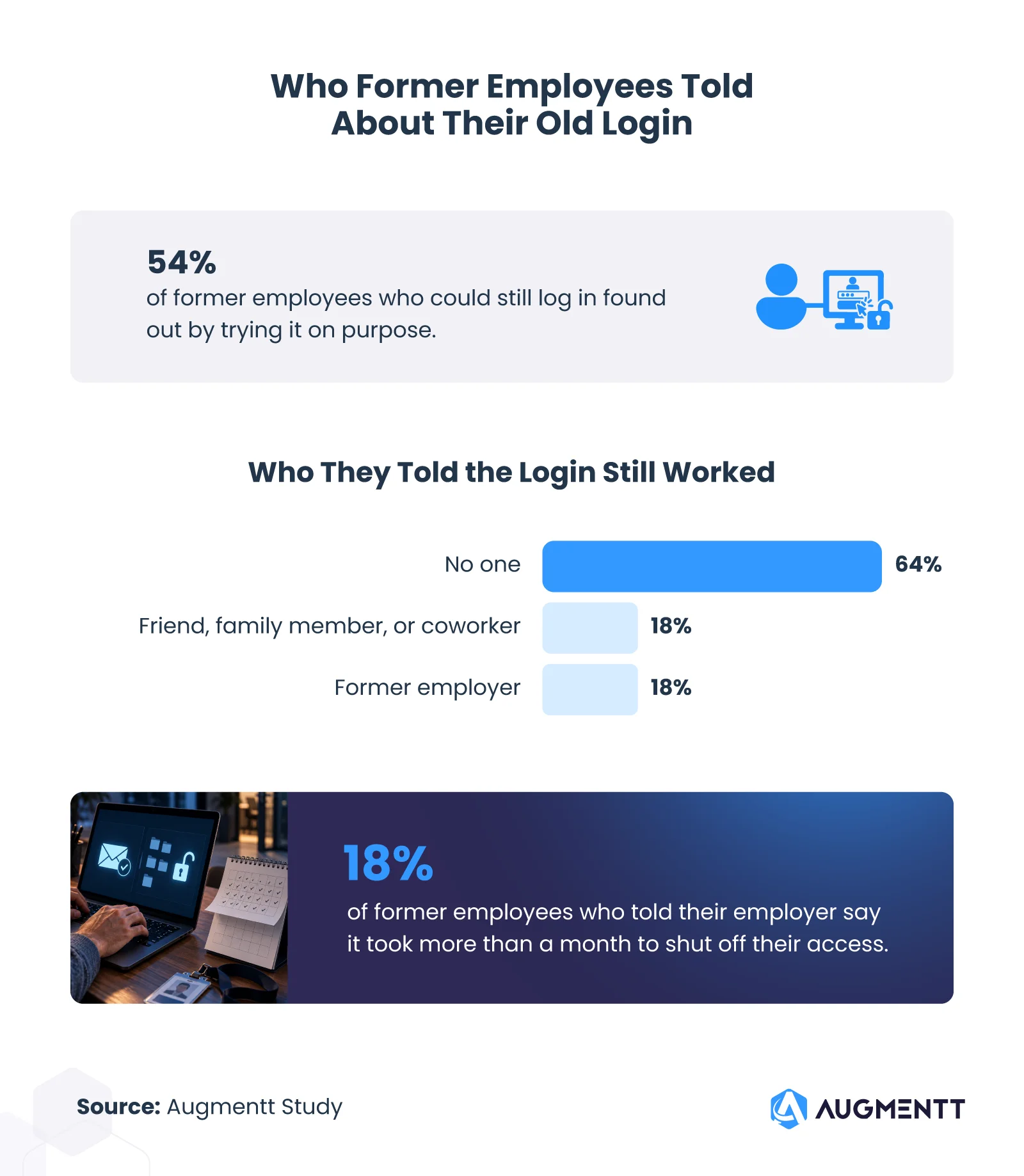
Among former employees with lingering access, 54% found out by trying their old login on purpose. Another 5% found out another way. Few spoke up about it: 64% told no one. But 18% told a friend, family member, or coworker, and 18% told their former employer.
Telling the employer didn’t always fix things. Among former employees who told their former employer, 41% said their access was shut off within a week. But 18% said it took more than a month, and 16% said it was never shut off.
Open logins showed up in every kind of IT setup. Among former employees at companies with in-house IT, 43% could still log in. The figure was 53% at companies with an outside IT company and 52% where nobody in particular ran IT. Another 16% did not know who ran IT at their old job, and 34% of them could still log in.
Among former employees who could still log in, the follow-up answers by IT setup were:
| Among former employees who could still log in | In-house IT | Outside IT company | Nobody ran IT |
| Access lasted more than three months | 24% | 28% | 31% |
| Told their former employer | 19% | 20% | 17% |
| Told no one | 62% | 55% | 65% |
| Used their access | 47% | 41% | 38% |
Offboarding is not done until the accounts are closed
Closing accounts should be a part of offboarding, and it’s a step that can’t wait. Most former employees who could get back in told no one, so waiting to be told isn’t the best option. For MSPs handling Microsoft 365 management for many clients, that means checking every account, app, and shared file on the last day, in the same order every time.
Methodology
We surveyed 1,007 employees who left a job in the past three years, including part-time, freelance, and contract jobs. The average age was 35; 54% were women, 43% were men, 2% were non-binary or gender non-conforming, and 1% preferred not to say.
All answers are self-reported. We did not check whether people could actually log in. Some questions went only to people with lingering access, and each finding names its group. “Outside IT company” includes any outsourced IT provider, such as an MSP. Differences we point out passed a standard statistical test at the 95% confidence level. Percentages are rounded and may not add to 100.
About Augmentt
Augmentt gives MSPs one place for multi-tenant M365 management, so technicians can secure every client tenant without logging into one portal at a time. Its core platform, Secure Autopilot, applies Microsoft 365 security baselines across all clients in one step and creates reports that show clients the work behind the scenes. With pricing on every MSP’s mind, Augmentt helps turn security from work you absorb into a service you can bill for.
Fair use statement
You are welcome to share the findings and visuals from this report for noncommercial purposes. When you do, please link back to this page so readers can view the full study and provide attribution to Augmentt.


