



A client calls because a guest joined a Teams meeting and started sharing their screen when they shouldn’t have been able to. You go looking for the setting, and it’s buried in the Teams admin center for that one tenant. You fix it there, then remember the other nineteen tenants are probably configured the same way, because nobody ever went back and standardized it. So you start clicking through each one by hand.
That’s the kind of work this release is aimed at. Here’s what shipped.
Standardize Microsoft Teams Across Every Tenant, From One Screen
Teams policies and settings are live in Secure Autopilot. You can now see and manage the Teams configuration that actually drives risk, guest access, external federation, meeting permissions, messaging permissions, without opening the Teams admin center for each client separately.
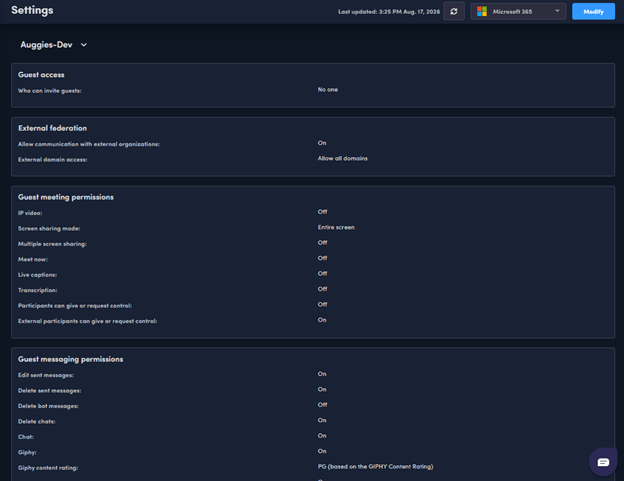
Alongside settings, you get Teams policies: Meeting, Messaging, Channels, and External access. Build a policy once as a template or baseline, then push it to every client the same way you already do with Conditional Access and Intune. No more recreating the same meeting policy from scratch for the fifteenth time.
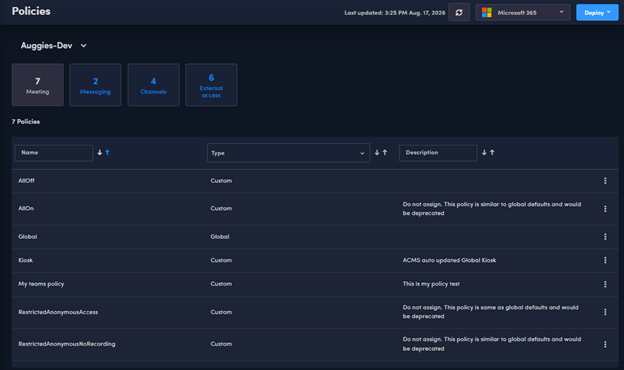
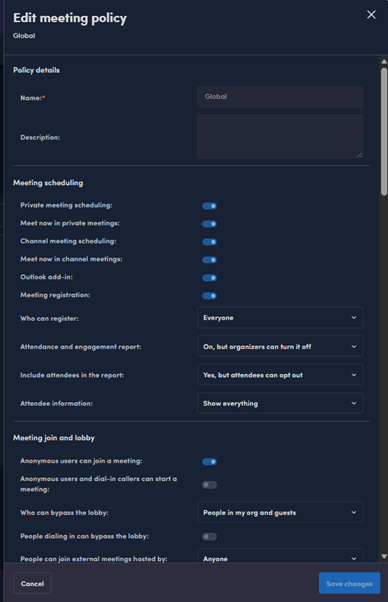
And when a client needs something adjusted on the spot, you don’t have to redeploy an entire policy. Inline edit lets you open a policy and change the specific setting live, right from the Augmentt portal.
Purview Gets Broader DLP Coverage, Plus Retention and Sensitivity Labels
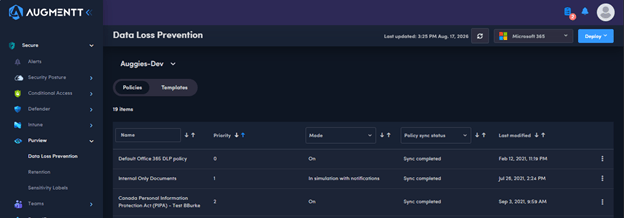
Two weeks ago we shipped Data Loss Prevention policy support. This release extends it. Augmentt now covers additional DLP policy locations, including Copilot, Foundry, Power BI, Managed Cloud Apps, and Inline Web Traffic, so the policy you build accounts for where data actually moves through a client’s tenant now, not just where it moved a year ago.
Retention Policies are here too. Apply retention across Exchange, SharePoint, OneDrive, Teams, and Groups, so a client’s data lifecycle rules are consistent everywhere instead of configured piecemeal per workload.
Sensitivity Labels round it out. Classify and protect data so you control what users, devices, and AI tools can actually access, and how that data can be used once they have it. As Copilot and other AI tools get pointed at client tenants, that label is doing real work.
Two New Checks Round Out Email Posture Coverage
Two new security checks joined the posture library this release: inbound anti-spam policies that don’t contain allowed domains, and outbound anti-spam message limits that aren’t in place. Both are common gaps and both show up in the same posture view you’re already using.
Defender EOP: Fix the Check, Right From the Recommendation
Augmentt has supported templating, deployment, and standardization of Defender EOP policies for a while now. This release adds per-security-check configuration on top of it.
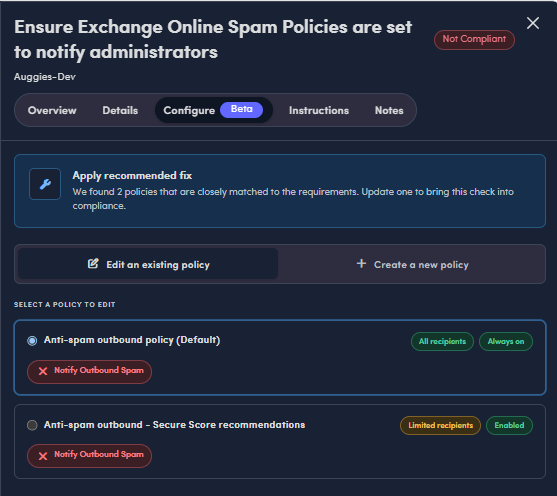
Instead of jumping into Microsoft’s admin center to figure out which setting a failing check actually wants, you can now edit the existing policy directly from the check itself, with the recommended settings already populated, through a short wizard flow. That covers all 34 Defender EOP checks Augmentt tracks against Secure Score.
Where to Find It
Teams settings and policies are under Secure > Teams. The expanded Purview coverage, DLP, Retention, and Sensitivity Labels, is under Secure > Purview. The two new anti-spam checks and the Defender EOP Configure tab show up right where you already review posture, under Secure > Security Posture, on the check itself.
FAQ
What’s the difference between Teams settings and Teams policies in Augmentt?
Settings cover the tenant-wide controls, guest access, external federation, and guest meeting and messaging permissions. Policies are the Meeting, Messaging, Channels, and External access policies you build as templates or baselines and deploy to specific groups of users, then edit inline when something needs a quick change.
Does the new Purview DLP coverage include Copilot?
Yes. This release adds DLP policy coverage for Copilot and Foundry, along with Power BI, Managed Cloud Apps, and Inline Web Traffic locations, on top of the DLP support Augmentt shipped two weeks prior.
How many Defender EOP checks can I now fix through the Configure tab?
34. Each one supports per-security-check configuration, so you can apply the recommended fix to an existing policy or create a new one without leaving the check.
Do I need to rebuild my Defender EOP policies to use the new configuration option?
No. The Configure tab edits your existing policies with the recommended settings needed to satisfy the Secure Score recommendation behind the check. You’re not starting over.
Where do the two new anti-spam checks show up?
Alongside your existing checks in Security Posture: one flags inbound anti-spam policies missing allowed domains, the other flags outbound anti-spam policies without message limits in place.
Photo by Roman Kraft on Unsplash