


March 2026 brings a dense set of M365 updates across security, identity, device management, and AI, several with hard enforcement deadlines that require immediate action. This article covers a curated selection of the updates most relevant to MSPs, focused on what affects tenant management, client security posture, licensing decisions, and day-to-day operations at scale.
Intune
macOS Recovery Lock Support is now available, allowing admins to set and rotate a recovery OS password on Apple Silicon Macs via MDM. This prevents users from booting into recovery mode to bypass security controls — a gap that has existed on Apple Silicon devices since their introduction. MSPs managing Mac fleets should implement this immediately as part of macOS security hardening, particularly for clients with compliance requirements aligned to frameworks like STIG.
Managed Installer Policy During Windows Autopilot OOBE now applies during device preparation, automatically marking Win32, Store, and Enterprise App Catalog apps as trusted before the user reaches the desktop. This reduces post-deployment app trust issues and the manual whitelisting overhead that typically follows. MSPs using Autopilot should validate that managed installer policy is configured to take advantage of this earlier in the provisioning flow.
The new Scope Tag De-Union Setting prevents role assignments with overlapping scope tags from granting unintended combined access. A new Permissions Assessment Report lets you preview the impact of enabling de-union before making changes. MSPs with complex Intune RBAC configurations across multiple client tenants should run the Permissions Assessment Report now to identify and remediate unintended privilege escalation before enabling the setting.
DDM-Based LOB App Reporting on iOS/iPadOS extends Declarative Device Management to line-of-business apps, enabling proactive real-time installation status reporting back to Intune rather than waiting for device check-in. This gives MSPs faster, more accurate deployment confirmation for iOS/iPadOS fleets. No more relying on check-in cycles to verify app status.
Windows Autopatch Update Readiness has reached General Availability with four new experiences: device-level quality update visibility, centralized alerts with remediation guidance, and an Update Readiness Checker across the tenant. MSPs using Windows Autopatch can now proactively identify and remediate update blockers before they cause compliance drift. Incorporate this into monthly patch management workflows.
Entra ID
Entra Connect Hard Match Block for Role-Assigned Users takes effect June 1, 2026. Starting that date, Entra Connect Sync and Cloud Sync will block hard-matching new AD user objects to existing cloud users that hold Entra ID roles, closing an account takeover vector via hard match abuse. MSPs must audit hybrid environments for any sync configurations that hard-match privileged cloud accounts before June 1; this is a breaking change with a defined enforcement date and no grace period after it hits.
Entra Backup and Recovery is now in Public Preview. Entra automatically takes daily backups of critical directory objects — users, groups, apps, Conditional Access policies, and more — with a 5-day retention window for P1/P2 tenants. Admins can view snapshots, generate diff reports, and run recovery jobs. For MSPs, this is a meaningful operational safety net: accidental deletion or misconfiguration of CA policies or user accounts can now be recovered without manual recreation, significantly reducing incident response time.
Synced Passkeys are now Generally Available as an authentication method in Entra ID, supporting FIDO2 passkeys stored in built-in or third-party passkey providers and manageable via passkey profiles in authentication methods policy. Passkeys are now production-ready and policy-manageable. MSPs should evaluate phishing-resistant MFA rollout plans for clients and update authentication method policies accordingly.
The Passkey Adoption Campaigns via Conditional Access Optimization Agent feature is in Public Preview. The CA Optimization Agent can assess readiness, generate deployment plans, guide users, and automatically enforce CA policies for passkey rollouts, starting in report-only mode. This automates the most operationally complex part of passkey deployment, allowing MSPs to drive phishing-resistant MFA adoption at scale without manual policy staging.
Cross-Tenant Security Group Synchronization is now in Public Preview, allowing organizations to synchronize security groups across Entra tenants for centralized group management. This requires Entra ID Governance licenses, a new licensing dependency MSPs need to account for. It’s relevant for MSPs managing multi-tenant organizations or clients with subsidiary structures where duplicate group management is a recurring overhead.
Defender
The Sentinel Azure Portal Sunset deadline has been extended by one year to March 31, 2027. MSPs with clients still managing Sentinel in the Azure portal have additional runway, but migration planning to the Defender portal should continue; this extension is not a reason to defer.
Sentinel Account Name Standardization takes effect July 1, 2026. Account Name in Sentinel analytics, incidents, and automation will shift to showing only the UPN prefix, with new fields introduced for full UPN and UPN suffix. MSPs managing Sentinel analytic rules, automation playbooks, or custom workbooks that reference Account Name fields must audit and update those configurations before July 1 to avoid broken logic.
The UEBA Behaviors Layer has reached General Availability in Sentinel, providing a behaviors layer that aggregates raw security logs into normalized, human-readable behavioral insights. A prebuilt behaviors workbook is included in the UEBA essentials solution. MSPs providing SOC or MDR services should enable the behaviors workbook for clients to accelerate triage and improve detection quality.
Defender for Endpoint Effective Settings Reporting is now Generally Available. A new “Effective Settings” tab on the device page shows the actual security settings enforced on each device, the configuring source, and any conflicting configurations that were not applied. This directly addresses one of the most common MSP pain points — verifying that intended security policies are actually in effect on endpoints — and should be incorporated into device compliance review workflows.
Custom Guidebooks (SOP) for Copilot Guided Response are now Generally Available. Organizations can upload their own Standard Operating Procedures into the Copilot Guided Response experience in the Defender portal to align investigations with internal processes.
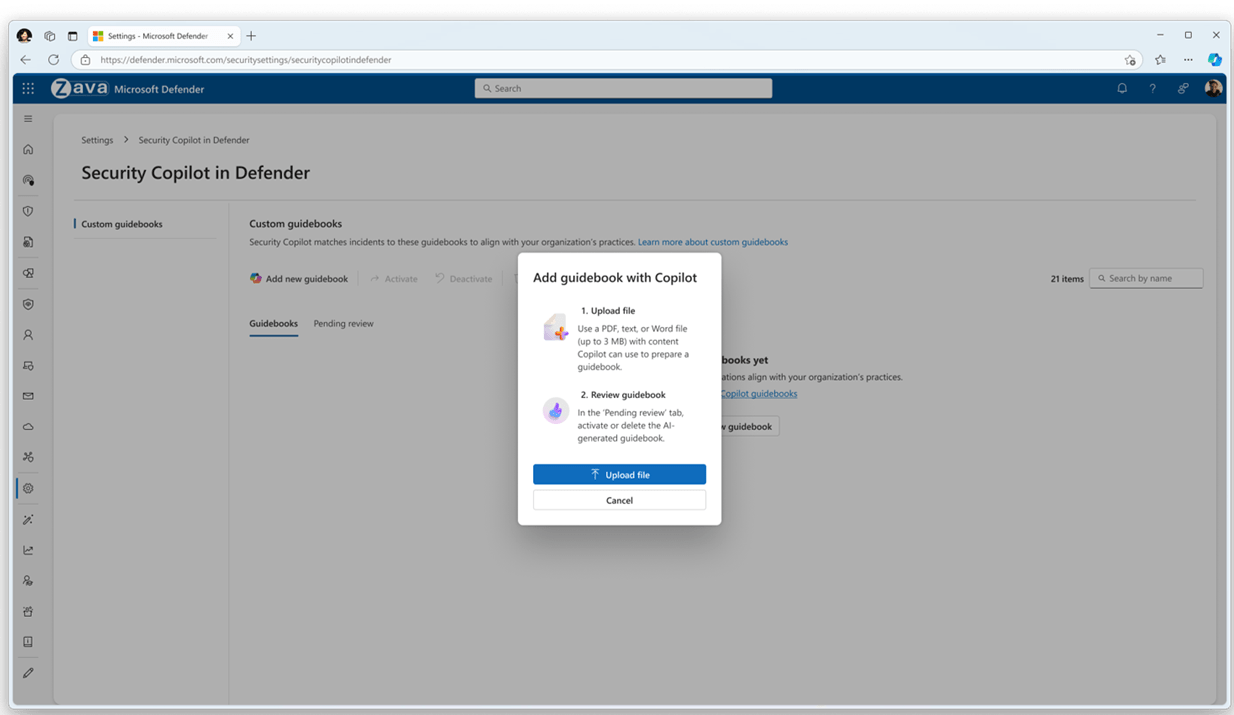
MSPs providing managed security services can now embed client-specific runbooks directly into the Defender investigation workflow, improving consistency and reducing escalation time.
Licensing
M365 E7 — the “Frontier Suite” was announced on March 9, 2026, priced at $99/user/month. It combines the full E5 security and compliance foundation with an integrated AI stack, and introduces a human-led, agent-operated model where AI can take action rather than just generate content. It also adds a unified governance layer for AI agents and cross-app intelligence not present in earlier suites.
A key component of M365 E7 is Agent 365, the control plane for agents, which will be Generally Available on May 1, 2026. Agent 365 extends existing user management infrastructure and incorporates Defender, Entra, and Purview to protect and govern agents, delivering observability, governance, and security for all agents across an organization without requiring a new management framework.
MSPs should monitor for official licensing documentation and detailed feature inclusions as they become available. The immediate priority is assessing whether E7 represents a cost-effective upgrade path from E3 or E5 for enterprise clients, and identifying where Copilot and agent governance requirements might make the SKU relevant in upcoming renewal conversations.
Purview
Sensitivity Labels for OneNote at Section Level are now Generally Available for manual labeling. This requires SharePoint/OneDrive sensitivity label enablement and activation via a PowerShell command: Set-SPOTenant -EnableSensitivityLabelforOneNote $true. This will not activate automatically — MSPs must add this command to post-update configuration checklists for any client using OneNote with sensitivity labels.
Auto-Labeling Policy Override for Lower-Priority Labels is moving from Preview to GA in April. Auto-labeling policies for SharePoint and OneDrive can now optionally override manually applied labels with lower priority, extending a capability previously available only for email. MSPs should review existing auto-labeling configurations before GA to confirm the override behavior aligns with client data classification intent. This is a behavioral change, not just a new option.
Data Security Investigations: Audit Search is now Generally Available, allowing investigators to collect content based on user activities — file access, copy, download — from the unified audit log. MSPs providing compliance services should update investigation runbooks to include audit search as a standard collection method.
The Insider Risk Management Quick Policy Template for Non-M365 App Data Theft is now Generally Available. It detects data theft from non-M365 apps by departing users and extends insider risk coverage beyond the M365 ecosystem. MSPs managing IRM for clients with mixed app environments — Dropbox, Box, personal cloud storage — should deploy this template as part of standard offboarding risk controls.
Teams
Teams on the Web — Browser Enforcement Deadline May 15, 2026: After May 15, Teams on the web will only load on ES2022-compliant browser versions. Users on older browsers will hit a hard blocking page with no fallback. MSPs must audit browser versions across all client environments now and push updates before May 15; this is a breaking change with a firm deadline.
Simplified External Collaboration Controls are now available in the Teams admin center. A new overview page consolidates external collaboration settings with guided Open/Controlled preset modes or a custom configuration path.
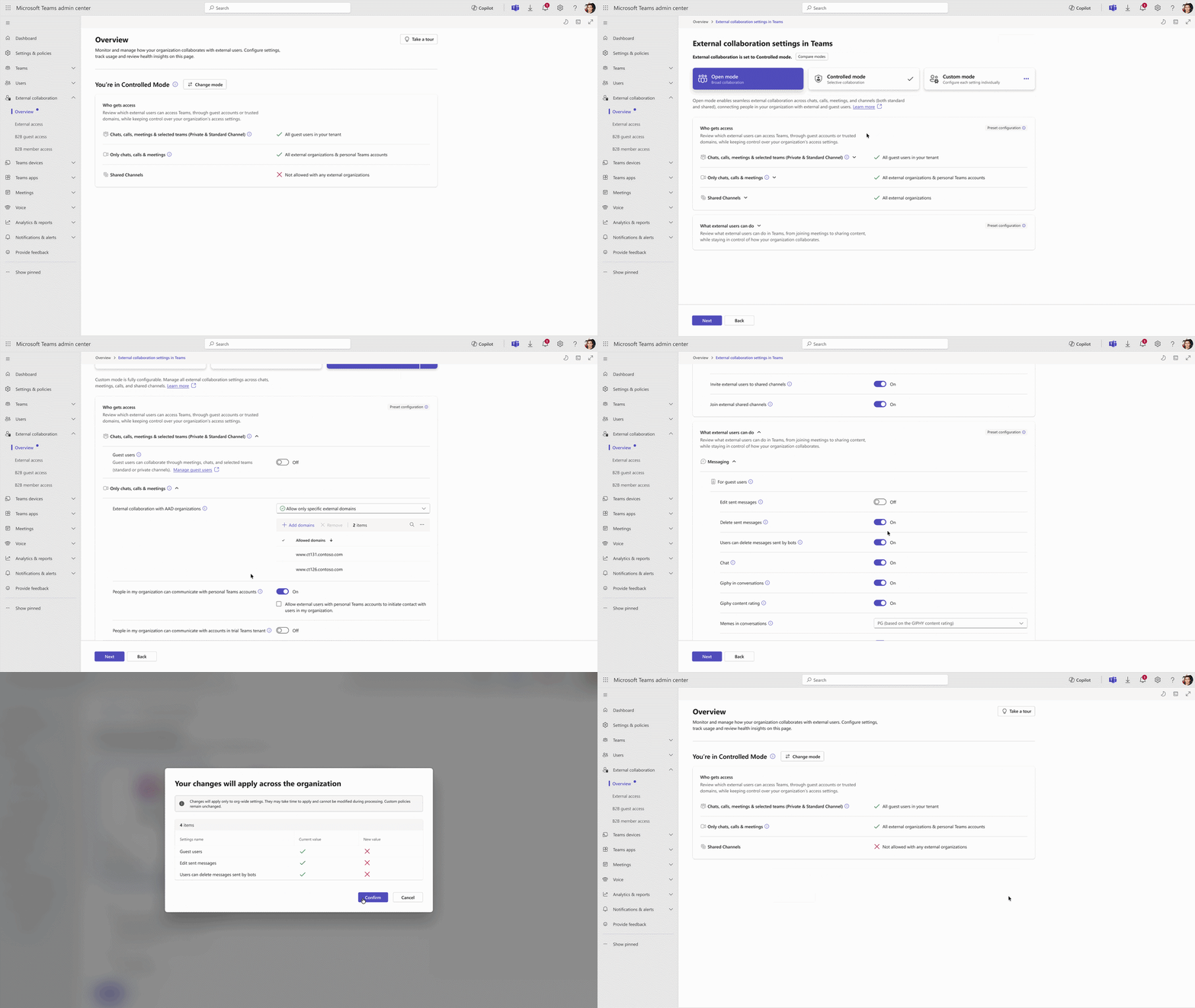
MSPs should review current external collaboration posture across client tenants and align settings to client security requirements using the new guided flow.
EXIF Metadata Stripping from Images Shared in Teams is now on by default. Teams automatically removes EXIF metadata — GPS location, device details — from images shared in chats and channels. No configuration is required, but MSPs should communicate this to clients in privacy-sensitive industries such as healthcare, legal, and finance as a positive compliance improvement.
The Multi-Tenant Multi-Account Activity Feed allows users to view and manage notifications from multiple tenants in a single consolidated feed without switching accounts, with sidebar pinning for key tenants.
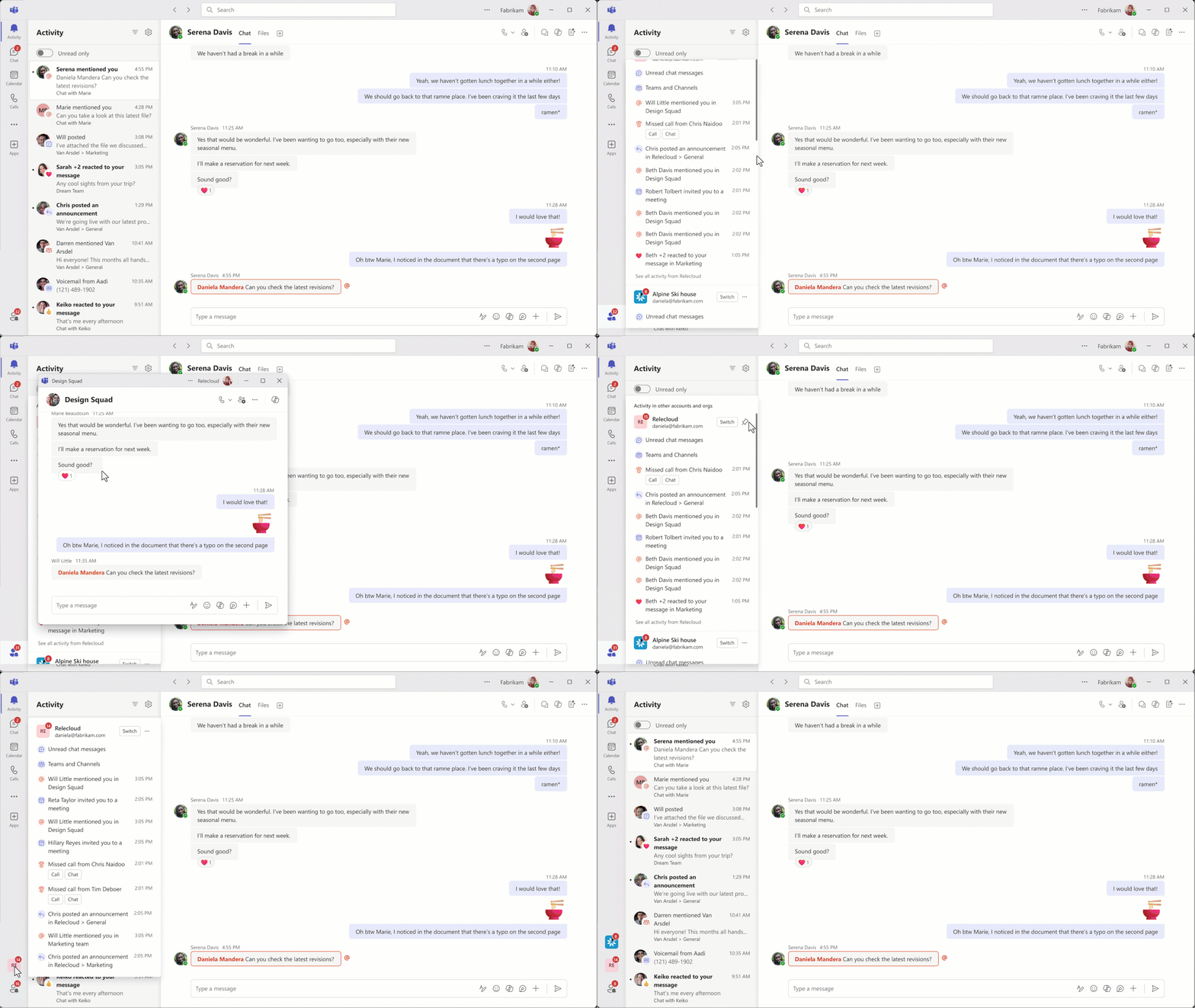
This is directly relevant for MSP engineers and client-facing staff operating across multiple tenants — it reduces friction and missed notifications in multi-tenant workflows.
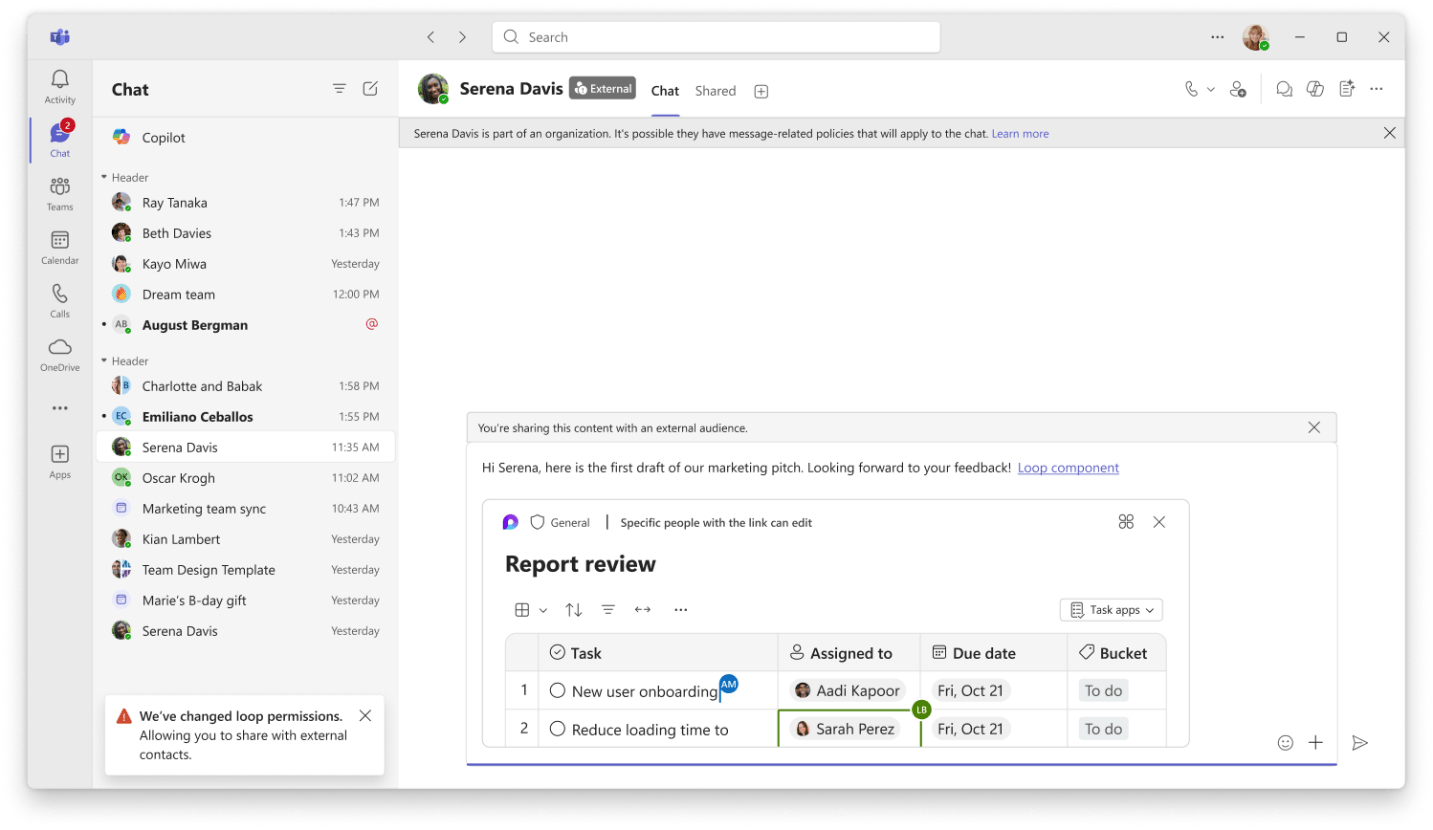
Sharing Files and Loop Components in External Chats is now supported in Teams, with automatic permission management for external participants. Admin configuration is required to enable this feature. MSPs should evaluate whether to enable it per client based on data sharing policies before it surfaces as a user request.
Copilot
Purview DLP Expansion to Copilot Prompts and Web Search enables Purview DLP to block sensitive data — financial data, national IDs, bank numbers, custom SITs — from being used in Copilot prompts and web search queries in real time. Web search DLP is in Public Preview rolling to GA in June; prompt DLP is rolling out in March.
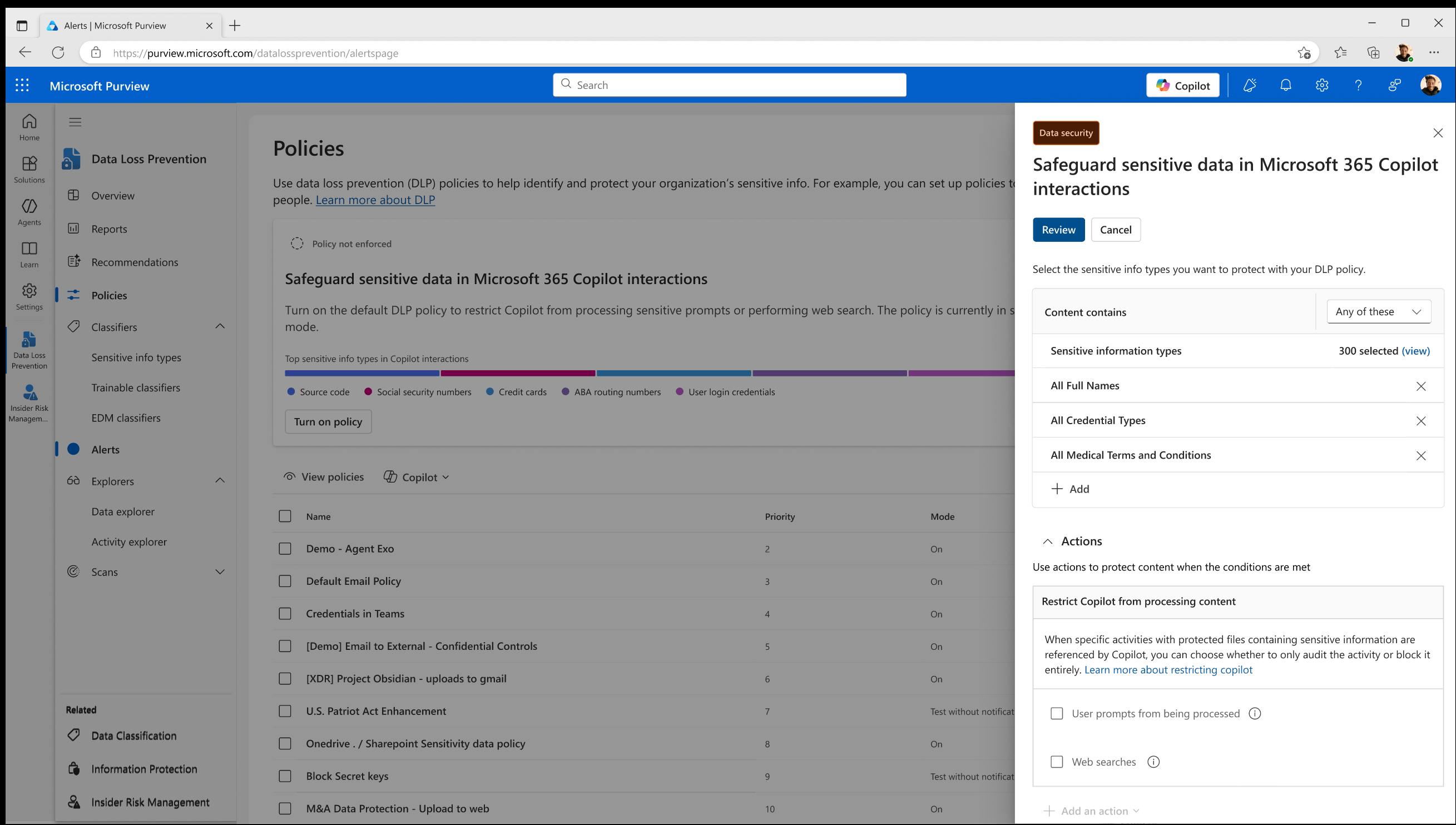
MSPs managing regulated clients now have enforceable controls to prevent sensitive data exfiltration through Copilot. Review and configure these proactively for any client with existing DLP policies.
High-Usage Users Visibility in M365 Admin Center surfaces a new “High-usage users” category that identifies individuals driving disproportionate consumption across pay-as-you-go Copilot services, rolled out in March.
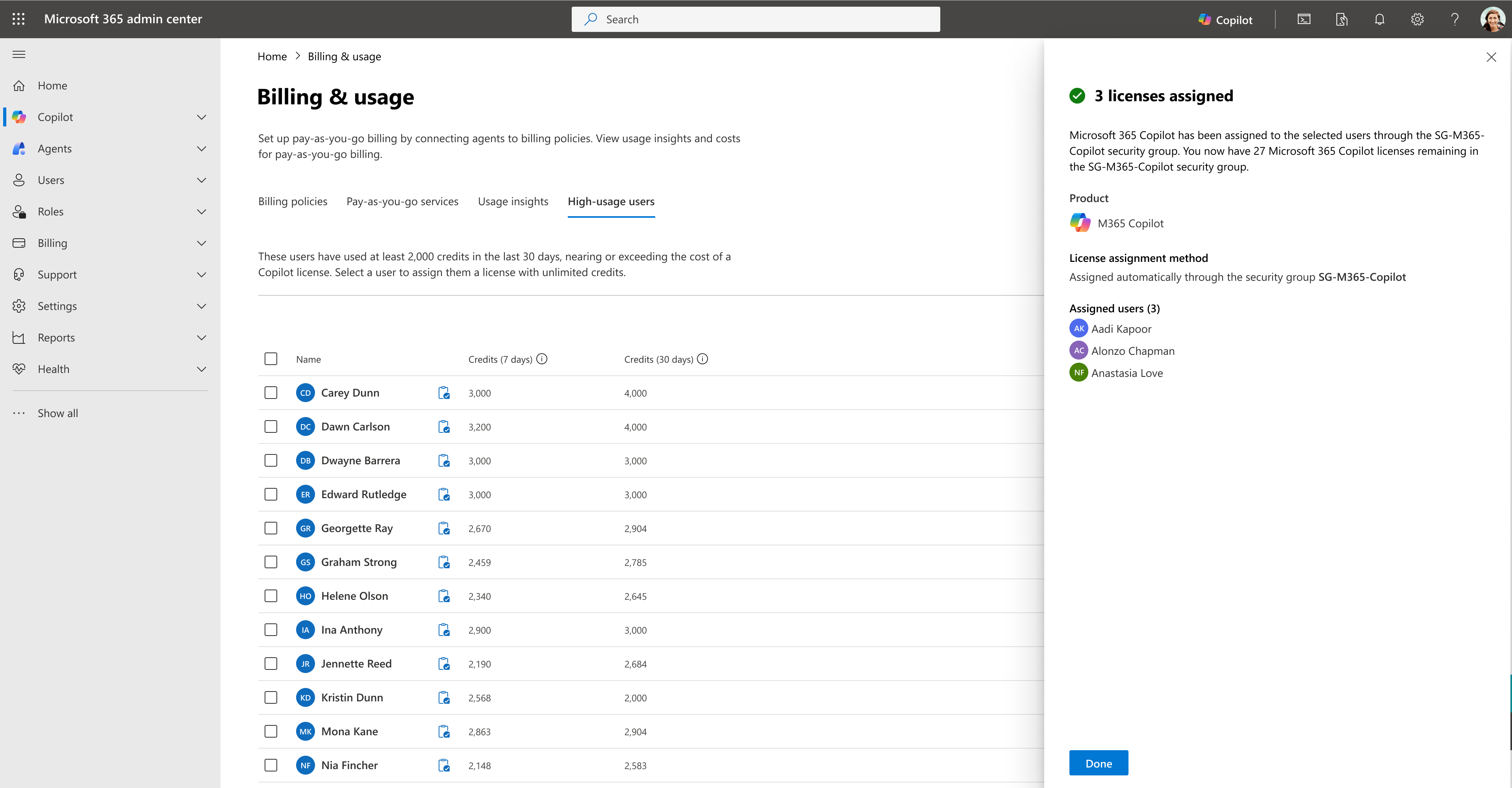
This is critical for cost management at scale. MSPs can now identify clients at risk of unexpected Copilot billing spikes before invoices arrive and adjust license allocation accordingly.
Copilot Tuning Templates in Agent Builder introduces new templates for document drafting, validation, and style editing, available to enterprises with 5,000 or more Copilot licenses. These roll to Frontier in April and worldwide in June.
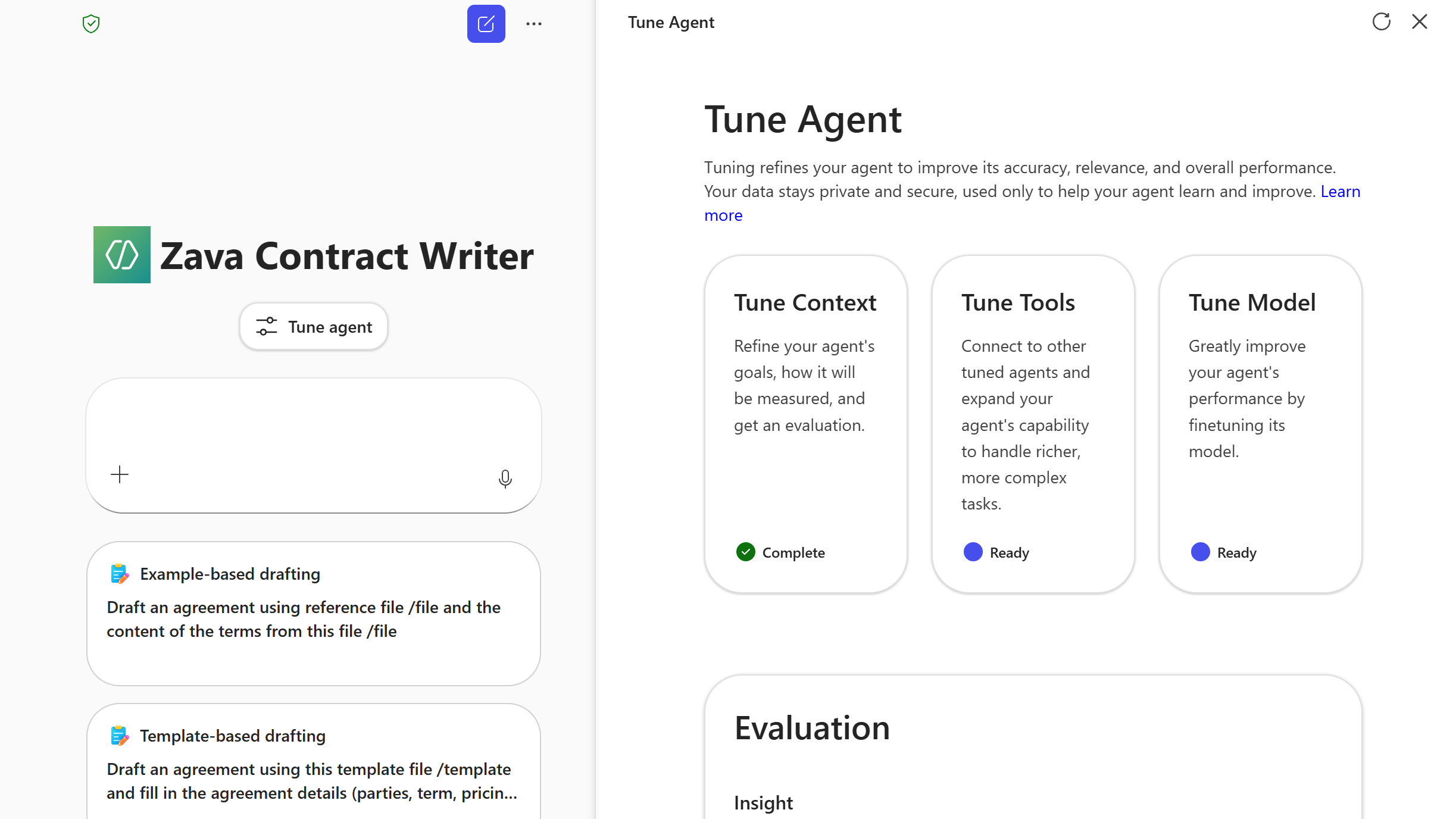
MSPs with large enterprise clients approaching the 5,000-seat threshold need to be aware of this capability and begin planning for agent governance and deployment support.
Domain Exclusion for Web Grounding allows admins to specify domains to exclude from Copilot’s web grounding, giving IT control over which external sources Copilot references. Rolling out in April. MSPs should include this in Copilot governance configuration checklists for clients in regulated industries with compliance or content governance requirements.
Authoritative Sources Management in Admin Center allows admins to designate SharePoint Online sites as authoritative for Copilot search results to improve relevance and ranking, rolling out in April.
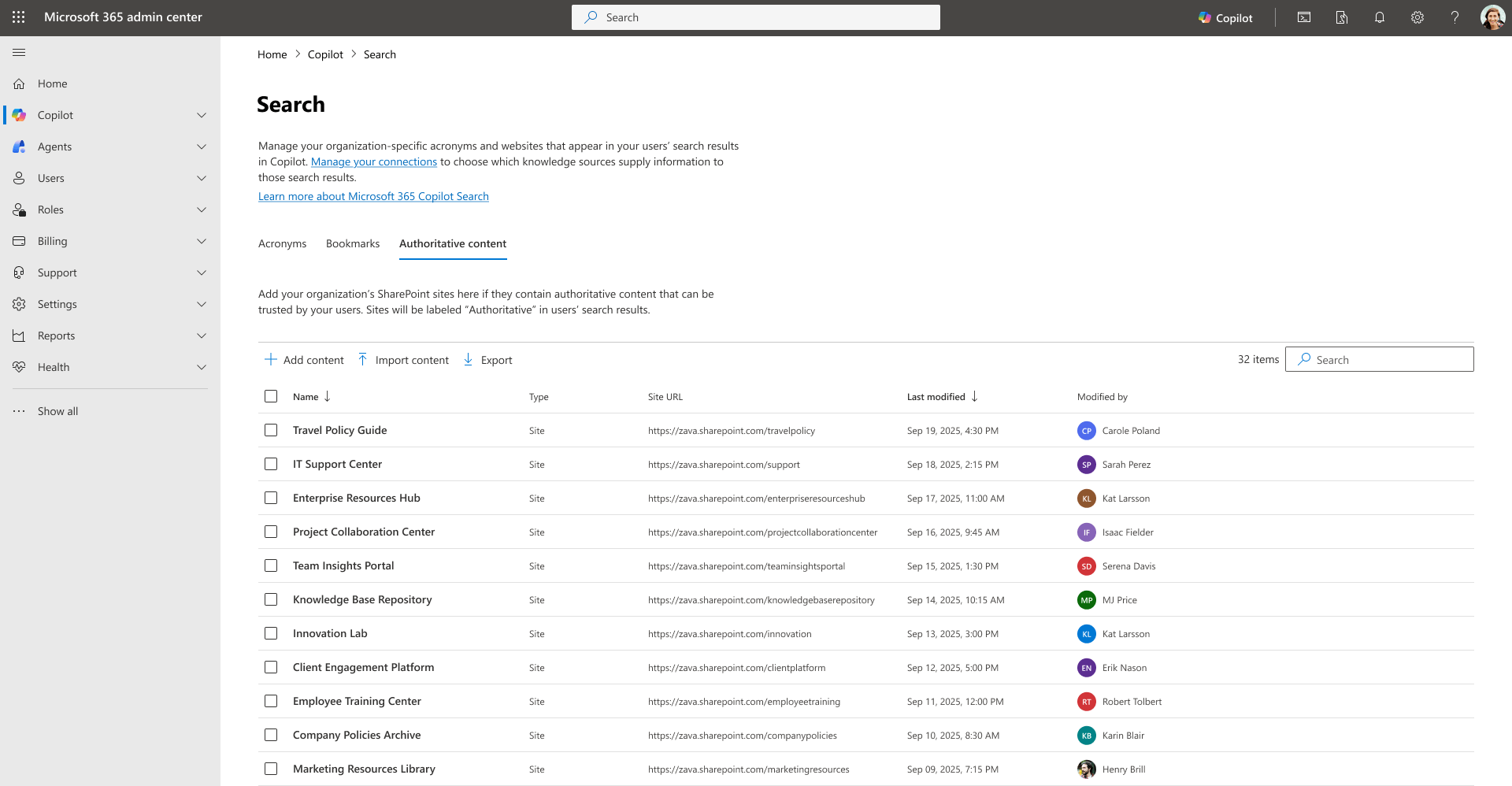
MSPs configuring Copilot for clients should plan to set authoritative sources as part of onboarding to ensure Copilot surfaces trusted internal content rather than noise from across the tenant.
Outlook
Online Archive Access for Shared Mailboxes in New Outlook is now available. The new Outlook for Windows surfaces the Online Archive folder directly in the folder list for shared mailboxes, resolving a long-standing gap. MSPs should communicate this to clients who have been staying on classic Outlook specifically for shared mailbox archive access since a common migration blocker is now removed.
Expanded Search Folder Configuration has moved to Settings with additional folder types and the ability to scope results to specific folders. The direct MSP impact is low, but this is relevant for clients being migrated from classic Outlook. Update end-user training materials and migration guides to reflect the new Search Folder location and capabilities.
OneDrive
Mark of the Web for Outlook Attachments means email attachments saved to OneDrive from Outlook now include the MOTW security tag, ensuring Windows Protected View applies when files are opened (Version 26.002.0105.0001). No action is required, but MSPs should note this as a positive security posture change. It reduces the risk of malicious attachments bypassing Protected View for clients using the new Outlook.
Custom OneDrive Folder Name via Group Policy allows admins to set a custom name for the local OneDrive sync folder, replacing the default “OneDrive – {org name}” convention to increase available path length (Version 26.032.0217.0003). MSPs can now standardize folder naming via Group Policy as part of OneDrive deployment templates, useful for clients with deep folder structures hitting Windows path length limits.
OneDrive Sync Health Dashboard for Government Clouds now supports GCC, GCC High, and DoD environments for proactive sync monitoring (Version 25.199.1012.0002). MSPs with government cloud clients should add the Sync Health Dashboard to monitoring workflows for GCC/GCC-H/DoD tenants.
Copilot Actions in File Explorer and OneDrive Activity Center allow users with M365 Copilot licenses to summarize, compare, and query files directly from File Explorer and the OneDrive Activity Center (Version 25.194.1005.0003). This feature is license-gated to M365 Copilot; MSPs should confirm client license assignments are accurate to avoid unlicensed feature access or user confusion.
SharePoint
Security Updates for SharePoint Server 2016, 2019, and Subscription Edition were released on March 10, 2026: KB5002843 for Subscription Edition, KB5002845 for SharePoint Server 2019, and KB5002850 for SharePoint Server 2016. MSPs managing on-premises SharePoint environments must apply these patches immediately as part of standard Patch Tuesday operations to maintain security compliance.
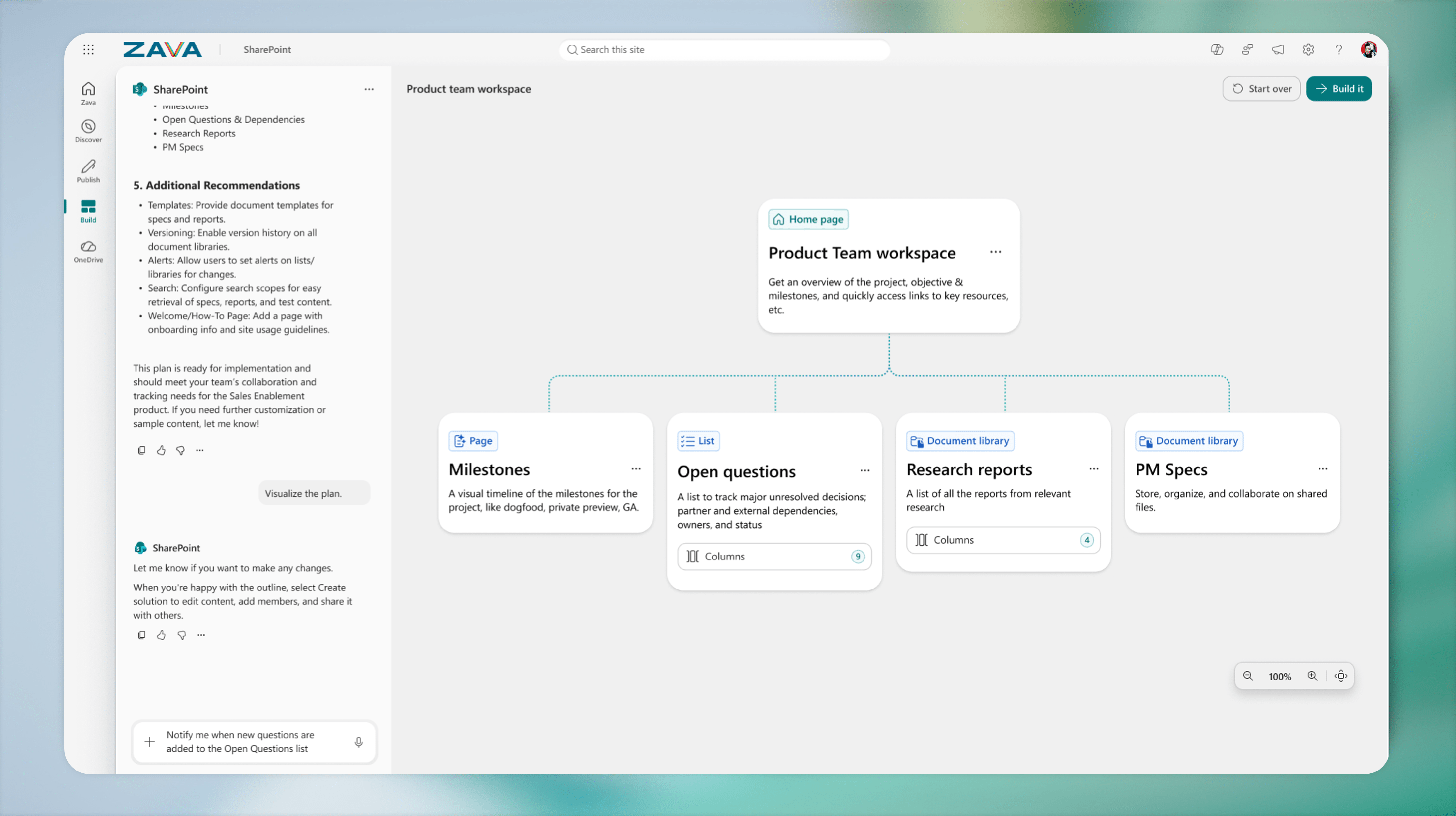
AI in SharePoint (formerly Knowledge Agent) is now in Public Preview, enabling natural language site, library, page, and list building. Worldwide rollout is planned for May. Notably, this preview is powered by Anthropic’s Claude model. MSPs should inform clients with strict data handling or AI governance policies before the May worldwide rollout, as a third-party AI model is involved.
March 2026 is a high-action month for MSPs, with two hard enforcement deadlines — the Teams browser cutoff on May 15 and the Entra Connect hard match block on June 1 — demanding immediate attention alongside the M365 E7 announcement reshaping enterprise licensing conversations. The depth of updates across Intune, Entra, Defender, and Purview reinforces how much of the MSP workload now lives in governance, compliance, and AI controls rather than just deployment.
Looking to simplify your multi-tenant management? Click here to see how Augmentt can help!
Cover Photo by Bank Phrom on Unsplash