


Managing Microsoft 365 for one client is straightforward. Managing it for 50 or 100 clients, each with their own tenant, security requirements, and user lifecycle needs, is an entirely different challenge that native Microsoft tools weren’t designed to solve.
MSPs that scale successfully treat multi-tenant M365 management as an operational discipline rather than a collection of ad-hoc tasks. This guide covers the core challenges, the capabilities that matter most, and how to build a repeatable approach to security, user management, and reporting across your entire client base.
What is Microsoft 365 multi-tenant management
MSPs manage Microsoft 365 for multiple clients by using centralized, multi-tenant tools like Microsoft 365 Lighthouse, Partner Center, and specialized third-party platforms. These tools enable automation, standardized security policies, centralized user onboarding and offboarding, and unified monitoring. The result is that MSPs can scale their operations without manually logging into each client environment one by one.
A tenant is simply a dedicated instance of Microsoft 365 services for a single organization. Multi-tenant management, then, refers to the practice of administering many of these separate client environments from one centralized platform or workflow.
Here’s why this distinction matters: internal IT teams typically manage a single environment, while MSPs often oversee dozens or even hundreds of unique tenants. This reality calls for a fundamentally different approach, one built around consistency, automation, and cross-tenant visibility rather than one-off configurations.
A few terms worth knowing as you read through this guide:
- Baseline: A standardized set of security and configuration settings that an MSP defines as their best practice and applies across all clients.
- Configuration drift: The gradual process where a tenant’s settings change over time, deviating from the established baseline due to manual changes or lack of oversight.
- Policy enforcement: The automated process of ensuring all tenants adhere to the MSP’s defined security and operational policies.
Why managing multiple M365 tenants is hard for MSPs
Without purpose-built solutions, MSPs struggle to manage Microsoft 365 at scale. The core challenges come from the fact that native Microsoft tools were designed for single-tenant administration, which creates significant inefficiencies and risks for service providers managing many clients.
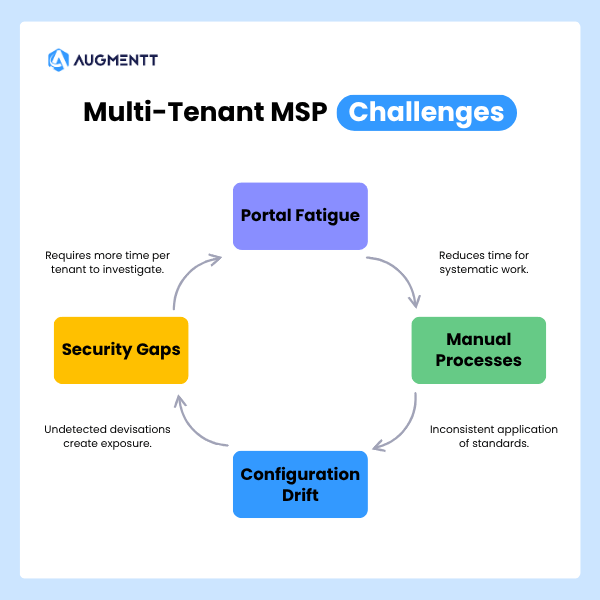
Configuration drift across client environments
When managing many tenants manually, maintaining consistent configuration becomes nearly impossible. Settings change over time due to one-off client requests, technician errors, or simply forgetting to apply an update everywhere. Tenants drift away from the MSP’s security baseline without any centralized oversight, and often nobody notices until something breaks or a security incident occurs.
Security gaps without centralized visibility
Lacking a single-pane-of-glass view across all tenants creates a major security risk. MSPs cannot easily identify which clients have inconsistent security policies, outdated settings, or emerging threats. This leaves dangerous gaps in service delivery that are difficult to spot until they become problems.
Manual reporting and compliance overhead
Generating security reports, tracking compliance, and preparing for client business reviews takes an enormous amount of time. Technicians often log into each tenant individually, gather data, and format reports manually. This process is both inefficient and prone to error, especially when managing 50 or 100 clients.
Portal fatigue from tenant switching
The constant need to log in and out of different Microsoft admin portals (Entra ID, Exchange, Intune) for each client drains productivity. This “portal fatigue” slows down service delivery and frustrates technicians who spend more time navigating than actually solving problems.
Why Microsoft Lighthouse falls short for MSPs
Microsoft Lighthouse is Microsoft’s native attempt at a multi-tenant tool, but it has significant limitations that prevent it from being a complete solution for most MSPs. Its restrictions on licensing, limited automation capabilities, and lack of deep remediation workflows explain why a market for third-party, purpose-built MSP platforms exists.
| Capability | Microsoft Lighthouse | Purpose-Built MSP Platforms |
|---|---|---|
| License Requirements | Restricted to Business Premium, E3, E5 | Generally license-agnostic |
| Baseline Deployment | Basic with limited customization | Deeply customizable templates |
| Automation | Limited, primarily alerts and basic tasks | Extensive remediation and reporting |
| Branded Reporting | No | Fully automated and brandable |
| Remediation Workflows | Basic recommendations, often manual | One-click and automated actions |
For MSPs serving clients across various license tiers, these limitations create real operational friction. You might find Lighthouse useful for visibility, yet still require additional tooling to actually act on what you see. The gap between “seeing a problem” and “fixing a problem” is where most MSPs feel the pain.
Essential capabilities for multi-tenant M365 management
To effectively manage Microsoft 365 for multiple clients, MSPs typically look for a management platform with a core set of features designed specifically for their business model. Here’s what matters most.
Centralized policy and configuration templates
The ability to define security policies and configuration settings once in a template, then apply them across all or a select group of tenants, ensures consistency and saves hundreds of hours over manual configuration. Instead of configuring each tenant individually, you configure once and deploy everywhere.
One-click security baseline deployment
A mechanism to apply security best practices to new and existing tenants quickly and reliably hardens environments without hours of manual configuration per tenant. This capability is particularly valuable during client onboarding, when you want to bring a new tenant up to your standards immediately.
Automated policy drift detection and remediation
The platform continuously monitors all managed tenants for unauthorized changes or deviations from the baseline. Ideally, it can automatically correct drift to maintain compliance without technician intervention. This turns security maintenance from a reactive task into a proactive, automated process.
Role-based access for tiered technician teams
Role-Based Access Control (RBAC) allows MSPs to grant L1 and L2 technicians access to perform specific tasks, like MFA resets or user onboarding, through a secure, audited interface without giving them full Global Admin rights. Junior techs can handle routine work safely, while senior engineers focus on complex issues.
Automated and brandable client reporting
The ability to schedule and automatically generate white-labeled reports for client communication, Quarterly Business Reviews, and compliance documentation is essential for demonstrating value without manual effort. Reports run on a schedule, pull data automatically, and arrive in your client’s inbox with your branding.
PSA and RMM integration
Integration with the MSP’s existing toolset, such as ConnectWise, Autotask, or RMM platforms, is critical for creating seamless ticketing, alerting, and billing workflows. When a security alert fires, it creates a ticket in your PSA automatically rather than requiring someone to notice and log it manually.
How to standardize Microsoft 365 security across tenants
Moving from theory to implementation requires creating repeatable and enforceable security standards across your entire client base. Here’s how MSPs approach this in practice.
Aligning with CIS, NIST, SCuBA, and Microsoft Secure Score
MSPs often map their security configurations to recognized industry standards like the Center for Internet Security (CIS) Benchmarks, NIST, Microsoft’s Secure Cloud Business Applications (SCuBA) framework, and Microsoft Secure Score. Aligning with these frameworks provides a defensible, best-practice foundation for your security offering and gives clients confidence that their environment meets recognized standards.
Deploying security baselines without premium licensing
Meaningful security monitoring and enforcement are possible across all Microsoft 365 license tiers. Purpose-built platforms can enforce critical security settings without requiring clients to have expensive E5 or other premium licenses. This is a significant advantage when serving SMB clients who may not have the budget for premium licensing but still expect solid security.
Automating breach detection and remediation
Automated alerts for suspicious activities, such as impossible travel, mass file deletion, or risky sign-ins, combined with one-click remediation actions dramatically accelerate incident response times. Platforms like Augmentt provide noise-tuned alerting that surfaces real threats without overwhelming technicians with false positives. When an alert fires, you can block a user, reset a password, or revoke sessions with a single click rather than navigating through multiple portals.
Automating user lifecycle management across M365 tenants
MSPs can streamline their most frequent and time-consuming administrative tasks, including onboarding, offboarding, and ongoing user management, through automation.
Streamlining onboarding with user cloning
User cloning allows a technician to replicate all settings, group memberships, and policies from a pre-configured template user. This ensures every new user is set up quickly, consistently, and correctly, regardless of which technician handles the request. Instead of manually configuring each setting, you clone from a template and make minor adjustments.
Configuring scheduled offboarding workflows
Automated offboarding workflows handle all necessary steps when an employee leaves:
- Converting the mailbox to shared
- Removing group access
- Reclaiming the license for reuse
- Setting an out-of-office reply
This process can be scheduled in advance to ensure nothing is missed. When HR notifies you that someone’s last day is Friday, you schedule the offboarding to run automatically that evening.
One-click MFA reset and access controls
Simplifying common helpdesk tasks like Multi-Factor Authentication resets into a one-click action within a central console reduces ticket volume and improves security hygiene. When MFA is easy to reset, technicians are more likely to enforce it consistently rather than creating workarounds.
Managing Intune and devices across multiple tenants
Device management via Microsoft Intune is a critical part of a complete M365 managed service, yet it presents the same multi-tenant challenges as user and security management.
Deploying Intune policies from a central console
A multi-tenant platform allows MSPs to define device configuration profiles and compliance policies once, then push them out to multiple client tenants. This ensures all managed devices meet security standards without repetitive manual work. You define your baseline device policy, and every client gets the same consistent configuration.
Monitoring compliance and detecting drift
MSPs benefit from a centralized view to track the compliance status of all devices across all clients. This includes identifying non-compliant devices and detecting any configuration changes that deviate from established Intune policies. When a device falls out of compliance, you see it in one dashboard rather than discovering it during a client call.
Creating predictable device enrollment workflows
Standardized enrollment profiles for Autopilot can be managed and deployed from a central console, creating a consistent and predictable device onboarding experience for end-users across different clients. New devices enroll the same way every time, which reduces support tickets and improves the end-user experience.
Best IT solutions for MSPs managing multi-tenant environments
Selecting the right multi-tenant management platform is crucial for growing your Microsoft 365 practice profitably. Here’s how to think about the decision.
Purpose-built MSP platforms vs enterprise tools
Tools designed specifically for multi-tenant MSP workflows differ significantly from tools built for single-tenant enterprise administration. MSP-specific design is essential for scalability, billing integration, and multi-client reporting. Enterprise tools assume you’re managing one organization, while MSP tools assume you’re managing many.
What to evaluate in a Microsoft 365 MSP platform
Key evaluation criteria include:
- Multi-tenant architecture: Is the tool built from the ground up for MSPs, or is multi-tenancy bolted on?
- Security framework alignment: Does it support standards like CIS benchmarks and Microsoft Secure Score?
- Automation depth: How much manual work does it truly eliminate?
- Reporting quality: Are reports automated, brandable, and client-friendly?
- Integrations: Does it connect with your core PSA and RMM tools?
- Pricing model: Is the pricing per-user or per-tenant, and does it scale profitably as you grow?
Questions to ask before selecting a vendor
Before committing to a platform, consider asking:
- What is your support model for MSP partners?
- What compliance certifications (SOC 2, GDPR) does your platform hold?
- What does the onboarding process for a new MSP partner look like?
- Can you share your product roadmap for the next 6-12 months?
- How does your platform help us prove the value of our services to clients?
How Microsoft 365 MSPs can simplify management and scale profitably
To succeed, MSPs operationalize their Microsoft 365 practice by turning it into a repeatable, standardized, and profitable managed service. This involves leveraging automation to enforce security baselines, streamline user management, and generate value-driven reports for clients.
By adopting a purpose-built platform, MSPs move away from reactive, time-consuming manual tasks and build a scalable engine for growth. Augmentt, for example, is designed to help MSPs automate, secure, and simplify M365 management across all their tenants from a single console.
See how Augmentt helps MSPs manage Microsoft 365 at scale →
FAQs about Microsoft 365 multi-tenant management for MSPs
Can MSPs manage Microsoft 365 tenants without premium licensing?
Yes. MSPs can implement meaningful security monitoring and best-practice configurations across all M365 license tiers using purpose-built management platforms that don’t require E5 or other premium licensing for their core functionality. Many security controls are available at lower license tiers when you have the right tooling.
How do MSPs onboard a new Microsoft 365 tenant quickly?
MSPs connect new tenants to their management platform via the CSP Partner Portal or delegated admin permissions. From there, they apply pre-built security and configuration templates in a single action to bring the tenant up to standard in minutes rather than hours.
What is the difference between Microsoft Lighthouse and third-party MSP tools?
Microsoft Lighthouse provides basic multi-tenant visibility but lacks the advanced automation, deep remediation workflows, license-agnostic support, and automated branded reporting that purpose-built MSP platforms offer for managing M365 efficiently at scale. Lighthouse shows you problems; third-party tools help you fix them quickly.
How do MSPs generate automated security reports for Microsoft 365 clients?
MSPs use multi-tenant management platforms with built-in reporting engines. They schedule reports to run automatically, pulling data from all relevant Microsoft services, formatting it into a professional branded template, and emailing it directly to clients or account managers without manual intervention.
Can junior technicians safely manage Microsoft 365 without full admin access?
Yes. Platforms with robust Role-Based Access Control allow MSPs to create custom roles for L1 and L2 technicians. These roles grant access to perform common, low-risk tasks through guided workflows without ever needing high-privilege accounts in Microsoft admin portals. Junior techs work safely within guardrails while senior engineers retain full control.