



TL;DR
- Disconnected security tools leave gaps between them, and those gaps are where breaches happen.
- Most Microsoft 365 attacks on SMBs, such as business email compromise, credential stuffing, and OAuth app abuse, target identity rather than the network.
- A core stack covers Microsoft 365 multi-tenant management, identity and access, email security, EDR, SaaS monitoring, and cloud backup.
- Build it by auditing current tools, defining baselines from CIS, NIST, or SCuBA, choosing multi-tenant tools, deploying templates, and connecting alerts to your PSA.
Most MSPs are already running some form of SaaS security: email filtering here, MFA there, maybe a backup solution bolted on.
The problem isn’t a lack of tools; it’s that disconnected tools create gaps, and gaps are where breaches happen.
A SaaS security stack brings these layers together into a coordinated defense that protects cloud applications like Microsoft 365 across all your client tenants. This guide covers what belongs in that stack, how to build it step by step, and how to turn it into a scalable managed service.
What is a SaaS security stack
A SaaS security stack is a layered collection of tools and policies that protect cloud-based applications from threats. Think of it as the security equivalent of defense in depth: if one layer fails, another catches the problem. For MSPs managing Microsoft 365, Google Workspace, or Salesforce across multiple client tenants, a SaaS security stack typically combines identity controls, threat detection, email filtering, and continuous monitoring into a unified approach.
Traditional security focused on firewalls and network perimeters. SaaS security operates differently because the applications live in the cloud, not behind your firewall. The attack surface has shifted to user accounts, credentials, and application permissions, which is exactly where a SaaS security stack concentrates its protection.
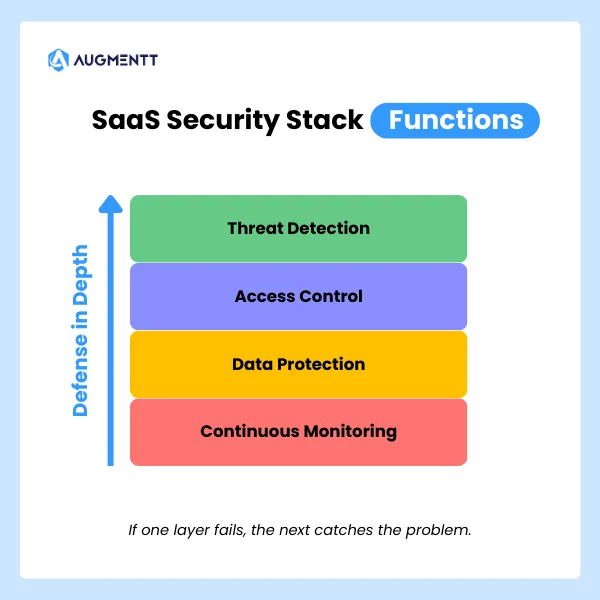
A complete stack handles several overlapping functions:
- Threat detection: Spots suspicious sign-ins, credential stuffing attempts, and unusual user behavior
- Access control: Enforces MFA, Conditional Access policies, and least-privilege permissions
- Data protection: Prevents unauthorized sharing and accidental exposure of sensitive files
- Continuous monitoring: Tracks configuration changes, shadow IT, and third-party app integrations
Why MSPs need a SaaS security stack
SaaS threats targeting Microsoft 365 and cloud applications
Microsoft 365 is the most common target for attacks against small and mid-sized businesses. Your clients use it for email, file storage, and collaboration, which makes it valuable to attackers too.
The attack patterns are predictable once you know what to look for:
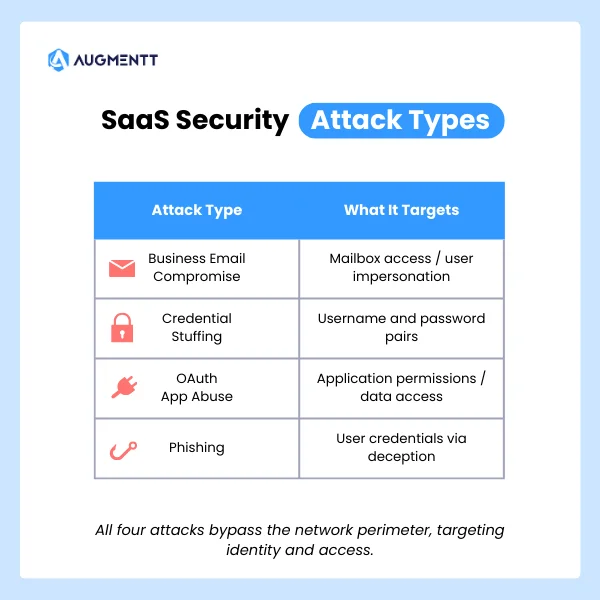
- Business email compromise (BEC): An attacker gains mailbox access and impersonates the user to request wire transfers or sensitive data
- Credential stuffing: Automated login attempts using stolen username/password combinations from previous breaches
- OAuth app abuse: Malicious third-party apps request excessive permissions, then quietly exfiltrate data in the background
- Phishing campaigns: Sophisticated emails that slip past native filters and trick users into handing over credentials
Each of these attacks targets identity and accessEach of these attacks targets identity and access rather than network infrastructure. That shift explains why perimeter-based security alone no longer provides adequate protection.
The hidden cost of fragmented security tools
Many MSPs piece together security coverage using disconnected tools: one for email filtering, another for endpoint protection, a third for backup. Each tool might work fine on its own, but the gaps between them create blind spots.
Technicians end up jumping between consoles, manually correlating alerts, and spending hours on tasks that could run automatically. Fragmentation also makes it harder to maintain consistent security policies across all client tenants. When every tenant has slightly different configurations, misconfigurations slip through consistent security policies across all client tenants. When every tenant has slightly different configurations, misconfigurations slip through.
Client expectations for proactive security
SMB clients now expect continuous monitoring and rapid incident response from their MSP. When a breach happens, they want to know you caught it early and took immediate action—not that you discovered it three weeks later during a routine check.
Security has become a core expectation rather than an optional add-on. Clients will move to competitors who can demonstrate proactive protection and clear reporting on what threats were blocked.
Core components of a SaaS security stack
Every MSP security stack looks slightly different depending on client mix and service offerings. However, certain layers form the foundation that everything else builds on.
| Component | Function | Example Tools |
|---|---|---|
| Microsoft 365 security | Multi-tenant visibility, policy enforcement, Secure Score monitoring | Augmentt, Inforcer, CIPP |
| Identity and access management | MFA, Conditional Access, centralized identity controls | Azure AD, Duo, Okta |
| Email security | Anti-phishing, safe attachments, link scanning | Defender for Office 365, Avanan, Proofpoint |
| Endpoint detection and response | Threat detection on managed devices | SentinelOne, CrowdStrike, Defender for Endpoint |
| SaaS monitoring | Unsanctioned app detection, usage tracking | Augmentt, BetterCloud, Torii |
| Backup and disaster recovery | SaaS data protection for email, OneDrive, SharePoint | Datto, Veeam, Spanning |
Microsoft 365 security and multi-tenant management
For most MSPs, Microsoft 365 sits at the center of everything. You’re managing email, file storage, collaboration, and identity within one ecosystem, often across dozens of tenants with different licensing levels.
Tools built specifically for MSP multi-tenant workflows let you see all your clients from a single dashboard, apply security baselinesTools built specifically for MSP multi-tenant workflows let you see all your clients from a single dashboard, apply security baselines without logging into each tenant individually, and track Secure Score improvements over time. This unified visibility separates scalable MSP operations from manual, tenant-by-tenant firefighting.
Identity and access management
Identity is the new perimeter. MFA enforcementIdentity is the new perimeter. MFA enforcement, Conditional Access policies, and centralized identity controls form the backbone of SaaS security.
Conditional Access refers to rules that block or allow sign-ins based on conditions like location, device type, or risk level. For example, you might allow sign-ins from managed devices but block access from unknown locations unless the user completes additional verification.
Without strong identity controls, a single compromised password can give an attacker full access to a client’s entire Microsoft 365 environment.
Email security and phishing protection
Native Microsoft Defender capabilities provide a baseline, but many MSPs layer on third-party email security for advanced phishing protection, attachment sandboxing, and data loss prevention. This additional layer is especially relevant for clients in regulated industries or those handling sensitive financial data.
Endpoint detection and response
Endpoint Detection and Response (EDR) tools monitor managed devices for malicious activity, suspicious processes, and indicators of compromise. While EDR focuses on the device layer rather than the SaaS layer, the two work together. A compromised endpoint often leads to a compromised cloud account.
SaaS application monitoring and shadow IT discovery
Shadow IT refers to applications employees use without IT approval, such as personal Dropbox accounts, unauthorized project management tools, or random browser extensions that request access to corporate data. These apps often sit outside your security controls entirely.
Discovering and managing shadow IT helps close security gaps and supports compliance requirements. You can’t protect what you don’t know exists.
Backup and disaster recovery
Microsoft’s native retention policies are limited and don’t protect against ransomware that encrypts or deletes data. Cloud-to-cloud backup solutions ensure you can recover email, OneDrive, and SharePoint data when something goes wrong.
How to build a SaaS security stack
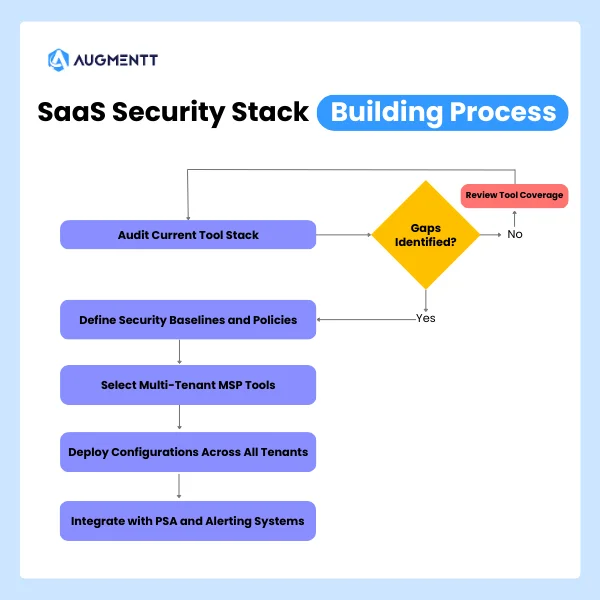
1. Audit your current MSP tool stack
Start by inventorying every security tool you currently use. Map out what each tool covers, where they overlap, and where gaps exist.
Key questions to work through:
- Does each tool support multi-tenant management?
- How well do your tools integrate with each other?
- Are you paying for overlapping functionality?
- Which tenants have inconsistent security configurations?
This audit often reveals that you’re paying for capabilities you don’t use while missing coverage in critical areas.
2. Define security baselines and policies
A security baseline is a standardized set of configurations you apply consistently across all clients. Rather than inventing policies from scratch, you can start with established frameworks like CIS Benchmarks, NIST guidelines, or Microsoft’s SCuBA baselines.
These frameworks provide tested recommendations for securing Microsoft 365 environments. They give you a defensible starting point and help during compliance conversations with clients or auditors.
3. Select tools built for multi-tenant MSP workflows
Enterprise security tools designed for single organizations often create friction for MSPs. You end up with separate logins, no cross-tenant visibility, and manual processes that don’t scale.
When evaluating tools, look for:
- Multi-tenant dashboard: A single view across all clients without switching contexts
- One-click deployment: Apply policies without manual configuration per tenant
- PSA/RMM integration: Fits your existing workflows and ticketing systems
- Noise-tuned alerting: Customizable alerts that don’t overwhelm technicians with low-priority notifications
4. Deploy security configurations across all tenants
Once you’ve defined baselines and selected tools, roll out configurations using templates and automation. The goal is consistency: every client gets the same foundational protection, with customizations layered on top as needed.
This approach also speeds up onboarding. When you bring on a new client, you apply your standard template rather than building security from scratch each time.
5. Integrate with your PSA and alerting systems
Security alerts are only useful if someone acts on them. Connect your SaaS security tools to your PSA so alerts automatically create tickets, and technicians can respond without switching between systems.
Tip: Look for platforms that offer noise-tuned alerts Look for platforms that offer noise-tuned alerts. Too many notifications lead to alert fatigue, where technicians start ignoring warnings—including the critical ones.
Best practices for managing your MSP security stack
Standardize configurations with security templates
Reusable templates speed up onboarding and ensure uniform protection across your client base. You might create different templates for different client profiles: one for healthcare clients with HIPAA requirements, another for general SMBs with standard security needs.
Automate breach detection and remediation
Automated alerting combined with one-click remediation actions dramatically reduces response time. Instead of spending 20 minutes investigating and remediating manually, a technician can block a user, reset a password, or revoke sessions in seconds.
Generate branded reports for QBRs and stakeholders
Automated, white-labeled security reports demonstrate value to clients without hours of manual work. Schedule reports to run monthly or quarterly, and use them during business reviews to show what threats were blocked and what improvements were made.
Explore how Augmentt automates security reporting for MSPs →
Review security policies on a quarterly basis
Threats evolve, Microsoft releases new features, and client environments change. Periodic policy audits help you catch configuration drift and adjust baselines to address emerging risks before they become problems.
How to align your SaaS security stack with compliance frameworks
Mapping to CIS and NIST controls
CIS Benchmarks provide specific, actionable configuration recommendations for Microsoft 365. NIST frameworks offer broader guidance on risk management and security controls. Aligning your stack to these standards strengthens client security posture and simplifies audit conversations.
Using Microsoft Secure Score and SCuBA baselines
Microsoft Secure Score is a built-in measurement of your tenant’s security configuration, expressed as a percentage. Higher scores indicate better alignment with Microsoft’s security recommendations.
SCuBA (Secure Cloud Business Applications) baselines from CISA provide government-tested recommendations for Microsoft 365 security. Both tools help you measure progress and identify configuration gaps across your client base.
Meeting cyber insurance security requirements
Insurers increasingly require specific controls (MFA everywhere, email security, backup verification) before issuing or renewing policies. A well-built SaaS security stack helps clients qualify for coverage and may reduce premiums.
Integrating your SaaS security stack with PSA and RMM
Reducing alert fatigue through smart integration
Not every security event deserves a ticket. Customizable, noise-tuned alerts let you filter out low-priority notifications while ensuring critical incidents get immediate attention. The goal is actionable alerts, not a flood of noise.
Key integrations for MSP security workflows
- PSA ticketing: Auto-create tickets from security alerts with relevant context included
- RMM: Correlate endpoint and SaaS security data for fuller visibility into incidents
- Reporting APIs: Feed security data into existing client reports and dashboards
Turn your SaaS security stack into a scalable managed service
A well-architected stack enables MSPs to deliver security as a repeatable, profitable service rather than a manual, ad-hoc effort. When your tools handle detection and remediation automatically, L1 and L2 technicians can safely manage tasks that previously required senior engineers.
This scalability transforms SaaS security from a cost center into a revenue driver. The key is choosing tools that reduce manual work while maintaining consistent protection across all tenants.
FAQs about SaaS security stacks for MSPs
Do I need premium Microsoft licensing to secure all tenants?
No—many SaaS security platforms can monitor and enforce best practices across Business Basic, Business Standard, and other non-premium license tiers. You can deliver meaningful protection without requiring E5 or premium add-ons for every client.
What is the difference between SaaS security and endpoint security?
SaaS security protects cloud applications and user accounts from threats like credential theft and unauthorized access. Endpoint security focuses on detecting and blocking malware or threats on individual devices. Both layers work together in a complete security stack.
How long does it take to deploy a SaaS security stack across multiple tenants?
With tools built for MSP multi-tenant workflows, initial deployment can happen within days rather than weeks. Pre-built security templates and one-click baseline application dramatically speed up the process.
Can I white-label security reports for my MSP clients?
Yes—many MSP-focused platforms allow you to brand reports with your logo and customize the content. This makes it easy to deliver professional security summaries during QBRs or stakeholder meetings.
How do I handle clients with different Microsoft 365 license tiers?
Use a SaaS security platform that normalizes visibility and policy enforcement across all license levels. This approach lets you apply consistent baselines even when clients have mixed licensing across Business Basic, Business Premium, and E3/E5 plans.
Cover photo by JC Mariano on Unsplash

